…or when dragging bullet under another bullet that is collapsed.
Feels more natural and removes the need to go manually reorder it afterwards which is the case almost always for me.
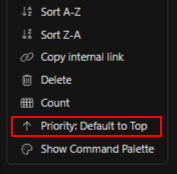
Have you tried these commands? (see Command Palette | Workflowy Help):
Priority
set_priority_default_top Makes new priority items appear at the top of the selected bullets.
set_priority_default_bottom Makes new priority items appear at the bottom of the selected bullets.
They work at least for the Move-to command, not sure about dragging.
These commands are set on a specific target node.
You can set top or bottom by node using the / command on the node. At the bottom of the / list is a toggle for top or bottom.
Thanks, I suspected I might have missed something.
Unfortunately, seems to require applying this to each individual bullet + child bullets.
Global setting or including child bullets would be nice.