search syntax improvement (e.g. parentheses, & support search verbs in a hierarchy search),
search history dropdown, eventually including delete & pin,
search nodes (though panes and multi-pane bookmarking do make search nodes much less pressing),
support for full breadcrumb discovery everywhere that breadcrumbs are shown, notably in “Show mirror breadcrumbs”, Found Dates, and Backlinks. (Could be mouse flyover / click, or 3 dots to click for a dropdown like GDrive, or an “expand” button, or…)
pane split either horizontally or vertically (like Edge & Chrome)
a number of small usability issues, but of course everyone has their own dreams there…
fixing whatever it is that causes so many issues in multi-panes, that are not present in single panes (my presumptuous hunch – refactor so they have common code base, maybe already underway? )
I haven’t found panes all that useful so far for various reasons, though I can certainly see why others might. So, I would still put “search nodes” at the TOP of my wishlist, because I have a very concrete use case for them that would significantly improve my workflow.
Agree, @jodmarch! We enjoy so many useful improvements to WorkFlowy. My wish list:
Search nodes → Use case: I would like to be able to see a collection of all the projects I am working on this week; perhaps each has a specific tag. Current work around: I mirror each project title to one of six child nodes “Current Week” node. Clunky. And sometimes I miss something because it’s hard to know if a node is properly mirrored. With search nodes, it would be smoother, more robust.
Including images when pasting from MD or HTML. When I paste from an MD or HTML source, I would like the option to include linked images. For me this is often explanatory graphics. Workaround: manually copy and paste each image.
Thank you, good idea: tag and search vs. mirror. Clean.
And you’ve helped me see something I didn’t include in my use case: I would love to embed that query or ones like it in key points of my outline instead of finding them on the left-side panel or entering a search query. For example, I would love to see and dive into (mirror-like) my current projects when I am viewing “Annual Strategy” or “Weekly Review.”
@michael In the meantime you can create a shortcut to the query and then use the Jump Menu Ctrl+; to execute from wherever whenever. It won’t be in line, but it will be quick.
This works well in a 2-pane setup. Annual strategy Query in one pane and annual strategy in the other.
I use this sort of setup frequently, so I have actually bookmarked the views where I have multiple saved searches side by side. Not search nodes per se, but some percentage of the way there.
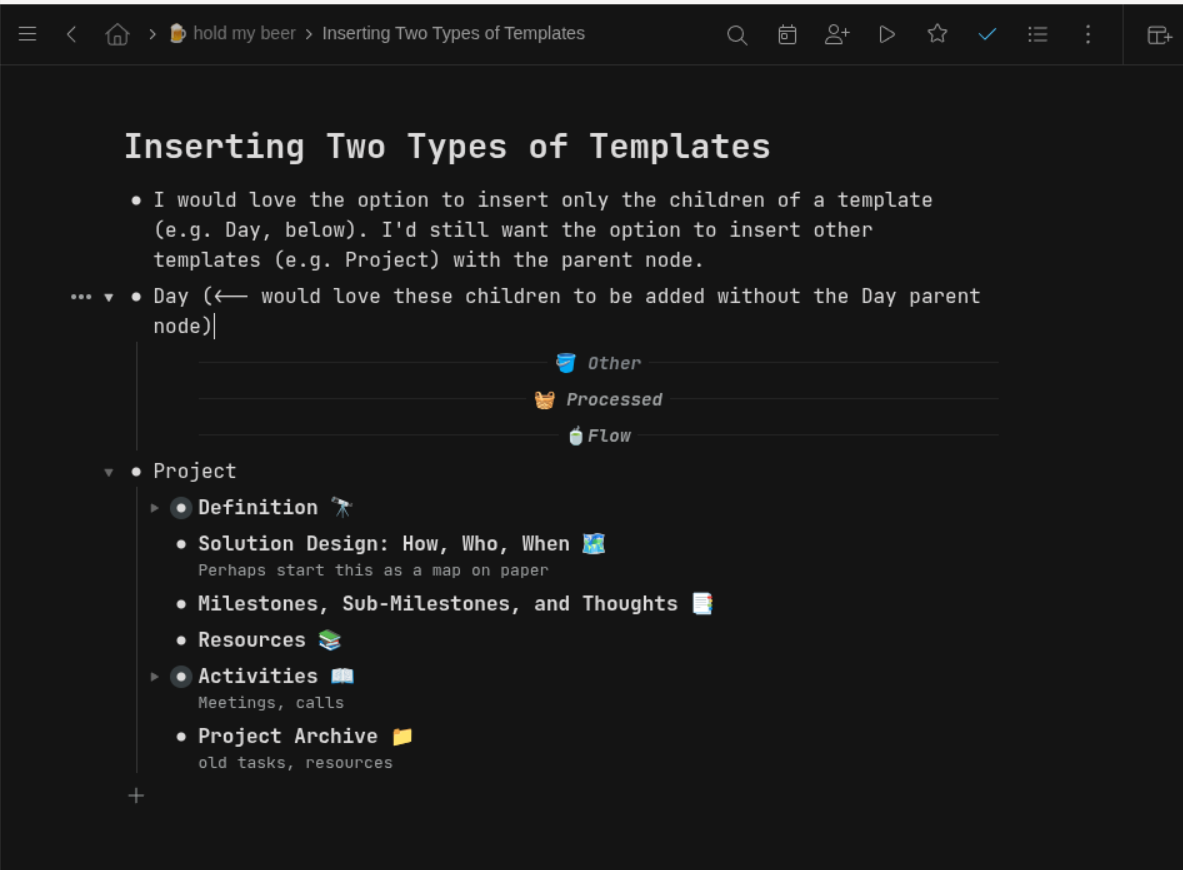
I have a fourth wish list item: I would love the option to insert a template’s contents without it’s top node. For example, I have a template called Day that I insert into each daily/calendar note. It shows up as a node called Day with several children. Instead of moving the children and deleting the node called “Day”, I’d love to have, say, a command like add_from_template_children_only. And preserve the standard functionality for templates like Project (see image).
Edit: I have suggested this (earlier this year or last year sometime) on the Slack user group. @jodmarch Would you recommend I post this as it’s own idea in this space?
Using the tip from WorkFlowy’s GTD Lite’s system help page, you can create a bullet with a querys index and mirror it where you want, knowing the query searchs apply only on the current bullet and its children…
Tip: You can use a mix of “@” tags (for people assigned to a task) and “#” tags for projects, contexts, next actions (GTD concept), waiting for tasks (GTD concept for tasks you delegated to someone), dates for due dates, and so on…
My current workaround is to use INTERNAL LINKS (instead of tags) to categorize things. Then you can use the BACKLINKS view to see a list in a single shot. Mirroring the original bullet then lets you put the list(s) wherever you want.
Since it’s in the backlinks, it’s a few extra clicks to SEE it, but it allows me to keep stuff visible together no matter where it is in my outline.
 )