I know about Zapier integration and Workflowy API keys, but what is the status/plan for a publicly documented Workflowy API (presumably for Pro users)? My use cases are: creating tasks, automating backups (not Dropbox), and a small terminal UI for workflowy. Thanks.
1 Like
Hi @mndrix
We’re beginning to think more about where we’re heading with an API. So it’s a good start!
2 Likes
Cool. While you’re in the planning stages, official support for Model Context Protocol so that folks can easily tie their Workflowy data into their AI of choice. It’s not my primary use case, but will probably write my own MCP on top of the Workflowy API for convenience.
Probably also worth mentioning as one trivial data point: I switched to Dynalist some years ago only because they had an API. I prefer Workflowy and want to switch back but am blocked on the API.
2 Likes
Tell me more about your use-cases for API - use-cases is something we’re having trouble extracting from the community, usually the conversation ends on “add API”.
Have you considered using this library? It’s not official, and it’s using our underlying private protocol (which I strongly recommend to not use), but I would like to know how close you think it is to do the job.
And there is also unofficial MSP implementation, which, again, uses our underlying protocol, but I assume it does the job. Would you say so?
Tell me what you want to do with the API, whether these two libraries are of any use to you, or if they lack functionality you need. Any extra information beyond “add API” will be useful.
3 Likes
Extracting data easily to be able to make calculation either on specific nodes or productivity
Being able to create a gg event in gg calendar when a node is created with a specific node (which is a date)
@m2xpro Sure, that makes sense. Have you tried the GitHub - karelklima/workflowy: WorkFlowy API for Deno and Node library written by one of our users? Could you please describe what’s missing from the library that would be necessary to implement the functionality you described?
I don’t think the details of an API matter that much. It’s for developers and hobbyists who will figure out how to work with whatever you provide as long as it’s reasonably stable: provide an API token that I can include in an HTTP request, expose a single useful endpoint (maybe “list children of $id”), then add more endpoints over time. If you get the API wrong, no big deal: freeze v1 and create v2 based on what you learned.
Yeah, over the years I’ve kept my eye on that one and another in Python. I don’t use Node or Python, so those aren’t much use specifically (most of my tools are in OCaml). Most of these tools also require disabling 2FA, which is not ideal.
More generally, I avoid things built on internal APIs because they have no assurance of stability. I’d rather not spend my time reverse engineering your internals or relying on others to do so. Dynalist was nice that way: I pay money and get a stable, supported API.
I listed my use cases at the top of this thread, but I’ll expound on them here in case that’s helpful. These are all things that I use the Dynalist API for right now.
creating tasks
I have two specific tools that use this API:
The first one is a command line tool where I run
$ task xxx yyy zzz
and it creates a new task beneath my Inbox node with title “xxx yyy zzz”. On Dynalist, this uses their Send to Inbox API. That API is especially helpful for this use case, but as long as each node in my tree has a stable identifier and there’s an API for creating a child for a specific node, it’d work fine.
My second use case for creating tasks is my private command line tool called habits. I run it each morning, and it calculates a list of tasks that should be added to my to-do list for today. Some of these recur daily, some are date patterns like “2nd Tuesday in May, June, and July”, others are more complex based on external data sources like weather or home automation data, etc. Anyway, this tool locates my “Tasks” node (a “File” in Dynalist; in Workflowy before I switched, it was just a child of the root node) then creates a new child node for each of the day’s new tasks.
More concretely, this use case needs a stable identifier for my “Tasks” node, a way to list all the children of that node so my habits tool can find the child for today’s date (“Tasks > Mon, 21 Jul 2025”), and a way to create child nodes within that node.
automating backups (not Dropbox)
I want daily backups of my lists saved to my own infrastructure. I don’t use Dropbox, so Workflowy’s daily backups there weren’t much use to me. Incidentally, this is a use case that the Dynalist API doesn’t handle either.
My old approach on Workflowy was, every morning, to manually “… > Export All > OPML > Click to download” then a local script noticed the new .opml file and saved it accordingly. On Dynalist, that workflow is “… > Download Backup” then the script notices the new .zip file, unpacks it, and saves the .opml accordingly.
a small terminal UI
I have a very primitive terminal UI (part of my task binary) that’s kind of like an old mail(1) interface. There’s a prompt, I enter small commands to view all children of the current node, “cd” to a different node, create a new node, etc. It’s not especially interesting, but I don’t always have a browser available or want the weight/complexity of one. Anyway, the necessary APIs are: list children of a given node, create a child within that node, delete a node, mark a node as complete.
My comments above about avoiding internal protocols apply here too.
I’m happy to give more detail on any of this that you want. I think the trick is to just offer some API, any API, and iterate from there.
Okay, here you go:
/api/beta/get-item/
/api/beta/list-children/
/api/beta/complete-item/
/api/beta/uncomplete-item/
/api/beta/create-item/
/api/beta/edit-item/
/api/beta/delete-item/
Your API key can be found here: Verification Required - Workflowy.
IDs of the items (nodes) can be found by inspecting the DOM:

Examples
All examples were executed against this outline:
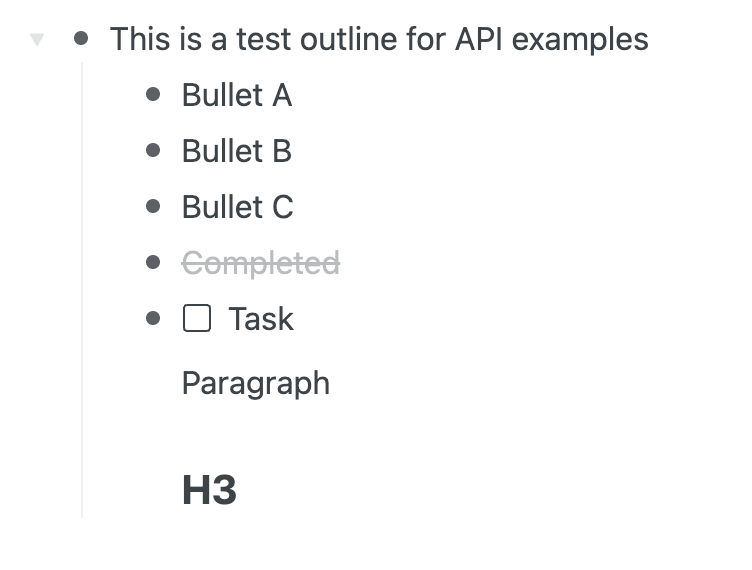
Get an item details
curl -X POST https://beta.workflowy.com/api/beta/get-item/ \
    -H "Content-Type: application/json" \
    -H "Authorization: Bearer <YOUR_API_KEY>" \
    -d '{"item_id": "<UUID_OF_AN_ITEM>"}' | jq
{
  "item": {
    "id": "6ed4b9ca-256c-bf2e-bd70-d8754237b505",
    "name": "This is a test outline for API examples ",
    "note": null,
    "priority": 200,
    "data": {
      "layoutMode": "bullets"
    },
    "createdAt": 1753120779,
    "modifiedAt": 1753120850,
    "completedAt": null
  }
}
Get children of an item
curl -X POST https://beta.workflowy.com/api/beta/list-children/ \
    -H "Content-Type: application/json" \
    -H "Authorization: Bearer <YOUR_API_KEY>" \
    -d '{"item_id": "<UUID_OF_AN_ITEM>"}' | jq
{
  "items": [
    {
      "id": "ee1ac4c4-775e-1983-ae98-a8eeb92b1aca",
      "name": "Bullet A",
      "note": null,
      "priority": 100,
      "data": {
        "layoutMode": "bullets"
      },
      "createdAt": 1753120787,
      "modifiedAt": 1753120815,
      "completedAt": null
    },
    {
      "id": "967ae17d-33d5-31d9-4c6a-0c191001e74a",
      "name": "Bullet B",
      "note": null,
      "priority": 200,
      "data": {
        "layoutMode": "bullets"
      },
      "createdAt": 1753120789,
      "modifiedAt": 1753120817,
      "completedAt": null
    },
    {
      "id": "17d78cb4-8c38-d400-d626-308f438ad7d3",
      "name": "Completed",
      "note": null,
      "priority": 350,
      "data": {
        "layoutMode": "bullets"
      },
      "createdAt": 1753120845,
      "modifiedAt": 1753120850,
      "completedAt": 1753120846
    },
    {
      "id": "88729243-d7bd-a57e-a3f5-d676ad0f7e2b",
      "name": "Paragraph",
      "note": null,
      "priority": 500,
      "data": {
        "layoutMode": "p"
      },
      "createdAt": 1753120822,
      "modifiedAt": 1753120825,
      "completedAt": null
    },
    {
      "id": "73c34c19-81bf-e6c7-fe3c-6b944888ff78",
      "name": "H3 ",
      "note": null,
      "priority": 600,
      "data": {
        "layoutMode": "h3"
      },
      "createdAt": 1753120825,
      "modifiedAt": 1753120833,
      "completedAt": null
    },
    {
      "id": "d5d6ca34-70c6-fa48-cb95-629bd6b2e333",
      "name": "Bullet C ",
      "note": null,
      "priority": 300,
      "data": {
        "layoutMode": "bullets"
      },
      "createdAt": 1753120790,
      "modifiedAt": 1753120821,
      "completedAt": null
    },
    {
      "id": "30bf0f45-4f2a-b0e5-8a70-10acf59be645",
      "name": "Task",
      "note": null,
      "priority": 400,
      "data": {
        "layoutMode": "todo"
      },
      "createdAt": 1753120799,
      "modifiedAt": 1753120822,
      "completedAt": null
    }
  ]
}
NOTE: The list isn’t ordered, you need to order it yourself based on the priority field.
Complete an item
curl -X POST https://beta.workflowy.com/api/beta/complete-item/ \
    -H "Content-Type: application/json" \
    -H "Authorization: Bearer <YOUR_API_KEY>" \
    -d '{"item_id": "<UUID_OF_AN_ITEM>"}' | jq
{
  "status": "ok"
}
Un-complete an item
curl -X POST https://beta.workflowy.com/api/beta/uncomplete-item/ \
    -H "Content-Type: application/json" \
    -H "Authorization: Bearer <YOUR_API_KEY>" \
    -d '{"item_id": "<UUID_OF_AN_ITEM>"}' | jq
{
  "status": "ok"
}
Add a child to an item
curl -X POST https://beta.workflowy.com/api/beta/create-item/ \
    -H "Content-Type: application/json" \
    -H "Authorization: Bearer <YOUR_API_KEY>" \
    -d '{"parent_id": "<UUID_OF_AN_ITEM>", "name": "Hello API"}' | jq
{
  "item_id": "5b401959-4740-4e1a-905a-62a961daa8c9"
}
Edit an existing item
curl -X POST https://beta.workflowy.com/api/beta/edit-item/ \
    -H "Content-Type: application/json" \
    -H "Authorization: Bearer <YOUR_API_KEY>" \
    -d '{"item_id": "<UUID_OF_AN_ITEM>", "name": "New Name"}' | jq
{
  "status": "ok"
}
Delete an item
curl -X POST https://beta.workflowy.com/api/beta/delete-item/ \
    -H "Content-Type: application/json" \
    -H "Authorization: Bearer <YOUR_API_KEY>" \
    -d '{"item_id": "<UUID_OF_AN_ITEM>"}' | jq
{
  "status": "ok"
}
- Please try to build what you want using this API and tell me if it’s not enough. Please show me examples of your own code, in the language you prefer — show me how you interact with the API, where it’s inconvenient, how your code would look like in the ideal world.
- Please tell me more about the Backup use-case, does it have to be OPML or you just want to download a big blob of something serialized, for the peace of mind?
3 Likes
This is rad! On this news, I’ve upgraded my account back to Workfly Pro (first time since 2022). A small way of saying thank you.
Will do. I’ll starting adding Workflowy support to my current tools and let you know how it goes. I’ll put my feedback in the other API thread.
Any blob that has all my info and is fast to download would be fine as long as it’s reasonably straightforward to parse. I’m sure I can transform the blob into OPML on my side.
OPML is handy because it’s the lingua franca of outliner tools. That’s how I migrated from Workflowy to Dynalist and now it’s how I’ll migrate back.
1 Like