I dream of transforming my lists into content ready to be quickly copied and pasted (for example, to fill out forms). For this, an option to add a “quick copy” button at the end of the line would be extremely useful. This would eliminate the need to select and copy, saving a lot of time.

Ctrl+Alt+DAlt+Shift+D will create a copy of the current node, Not sure if that is exactly what you want. Whether the #copy appears can be managed with a toggle in settings,
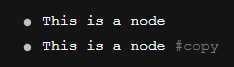
It’s Alt + Shift + D on my Windows system
Thanks @danympelletier. LMAO, had a bit of a brain freeze there. Corrected the original post.
1 Like
I guess OP means the copy-to-clippboard button like in a code block. I wish there was one for the in-line code blocks as well. For a whole bullet it is possible to tripple-click to select all.