Optional confirmation before completing or deleting mirrored items

Hi everyone,

I’d like to suggest an optional confirmation dialog before completing or deleting an item when that action would also affect other mirrored locations.

I understand that keeping changes synchronized is the whole point of mirrors. However, it can be easy to overlook that connection while working in a particular location—especially when zoomed into a mirrored item and using it as the current heading.

I’ve accidentally completed items this way many times, affecting them in other locations too. This has made me reluctant to use mirrors, even though I find the concept useful.

Could there be an optional “mirror protection” setting that warns before these actions? Ideally, the dialog would explain that other locations will be affected and offer three choices:

  • Continue: apply the action across the linked locations.
  • Cancel: leave everything unchanged.
  • Detach this mirror first: turn this instance into an independent copy, then apply the action only to that copy.

This prompt would only show when actually completing a mirrored entry and be an optional setting for those who prefer the current system without this change.

Making this optional would let users who want the extra protection enable it without interrupting anyone else’s workflow.

Or there could be a separate option in the panel for “completing only this instance of the mirror” or similar. Perhaps “Complete instance” or “Complete mirrored instance” for short.

Is there already a way to achieve this? If not, I’d really appreciate this option.

Thanks!
Hi Daniel!

deleting an item when that action would also affect other mirrored locations.

It does not touch those locations. It just removes the “deleted” mirror instance.

confirmation dialog before completing

This looks like the plausible use-case. But the details leave me unpersuaded. The point of a mirror is that literally the SAME item can be viewed in multiple contexts (e.g. a single prerequisite to 2 different projects, and/or a journal listing). So if it’s a task, then it should be the SAME task, so how could it be completed for one mirror but not for another? It sounds like you are using mirroring to make an new task which is worded identically to the original task, but is not literally the same instance of the task. Your willingness to detach the mirror indicates to me that this likely is the case. This does not seem to me like a good use-case for mirrors from the start, rather perhaps for additional variations of the duplicate command (duplicate to, duplicate here). Or perhaps for a template.

Or there could be a separate option in the panel for “completing only this instance of the mirror” or similar. Perhaps “Complete instance” or “Complete mirrored instance” for short.

As far as I know, not possible without a complete re-conceptualization and re-engineering of mirrors.

1 Like

Hi, thanks for the clarification! I understand your point that mirrors represent the same item, so completing it updates every location.

I also realize that deleting the local mirror, or my earlier suggestion of a separate “complete this instance” option, would not solve the underlying problem for me: I may not realize that I am working inside a mirror in the first place.

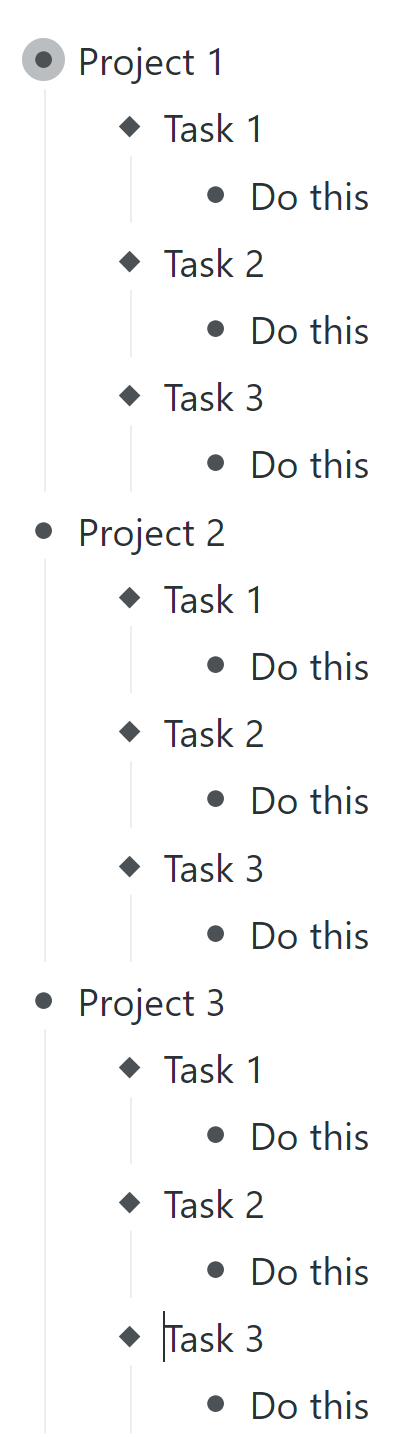
For context, the screenshots below illustrate something I recently did with three separate projects. All three needed the same working structure and tasks, which I was still modifying as I worked. Mirrors were useful because I could refine the shared structure and task instructions on the fly, and the changes would immediately appear in all three projects.

But then I finished Task 1 in one project and marked it complete. It disappeared from the other two projects’ active lists as well—even though I still needed to carry out that work in those projects. In that view, it is easy to forget that completing an item will affect the other projects too.

I often complete tasks simply by selecting the task heading and pressing Ctrl+Enter. Deleting the local mirror or choosing a separate menu option would require me to keep track and rememer the mirrored context first—which is exactly what I can miss.

I understand that this combines shared task definitions with separate progress, which is not how mirrors currently work. However, ordinary duplicates or a static template would lose the ongoing synchronization that made mirrors useful while I was refining the workflow.

So I would narrow my request to an optional confirmation warning before completing something when that action will also affect other mirrored locations, including when working inside a mirrored parent. For example:

“This action will also mark this item complete in other mirrored locations. Continue?”

That would give me a chance to cancel and decide whether to detach or reorganize the relevant items first. For me, an optional warning is the solution that addresses the actual problem: overlooking the mirrored context when using the normal completion shortcut. It would preserve how mirrors currently work, while letting people who want this safeguard enable it.

Thanks! It can be a tough call for software devs to decide which options will be broadly useful, vs a “nice to have” for a few users. Proliferation of options adds technical load to a project and can make it harder for many users to find the options that they do need.

I might be too blinkered, but to me it seems to me that this use case is wanting to have your cake and eat it too. Surely there should be a time in the usage that you describe, when you are no longer tinkering with the mirrored structure, and actually starting to use it, at which point it’s time to detach them all? Or if this brinksmanship is really useful, perhaps you could temporarily include in the mirrored header the text “WIP (Mirrored)” or similar? Or color it red?

Or perhaps a request (which I think might be broadly useful) would be to show the mirror diamond on any mirrored header, so this was never a surprise?

“Or perhaps a request (which I think might be broadly useful) would be to show the mirror diamond on any mirrored header, so this was never a surprise?”

This would actually also work I think, something where it is actually clear even when working directly in Mirrored item as the head that it is an actually mirror that is the head item. As far as I see now there is no way to detect you are working in a mirror unless you manually edit it as you suggested.

You probably already know this, but for the record, there is a way even now to see whether your page header is a mirror, and that is with the command show_mirror_breadcrumbs . I have it mapped to Alt+Ctrl+Shift+B so it’s pretty quick, but of course nowhere near as fast as just having a symbol or icon visible.