Panes: what do you expect when opening and resizing them?

We’d like to understand how you use panes and what you expect when opening or resizing them.

1. What does your usual pane setup look like?

  • How many panes do you usually have open, and what do you keep in them?
  • Which panes need to stay visible together?

2. When you open another pane, what do you expect to happen?
Imagine you have three panes arranged as you like and open a fourth. Would you expect:

  • Existing panes to keep their widths, with horizontal scrolling to reach panes beyond the window?
  • All panes to resize so they remain visible within the current window?

Would you expect the same behavior when opening a pane through the new-pane button, a link, or a keyboard shortcut?

3. When you drag a divider to make a pane wider, what do you expect?

  • The neighboring pane gets narrower, keeping their combined width the same.
  • Other panes get narrower to make room, so everything stays within the current window.
  • Other panes keep their widths and move sideways, potentially beyond the window.

You don’t need to answer everything or limit yourself to these examples. Examples from your own setup are welcome.

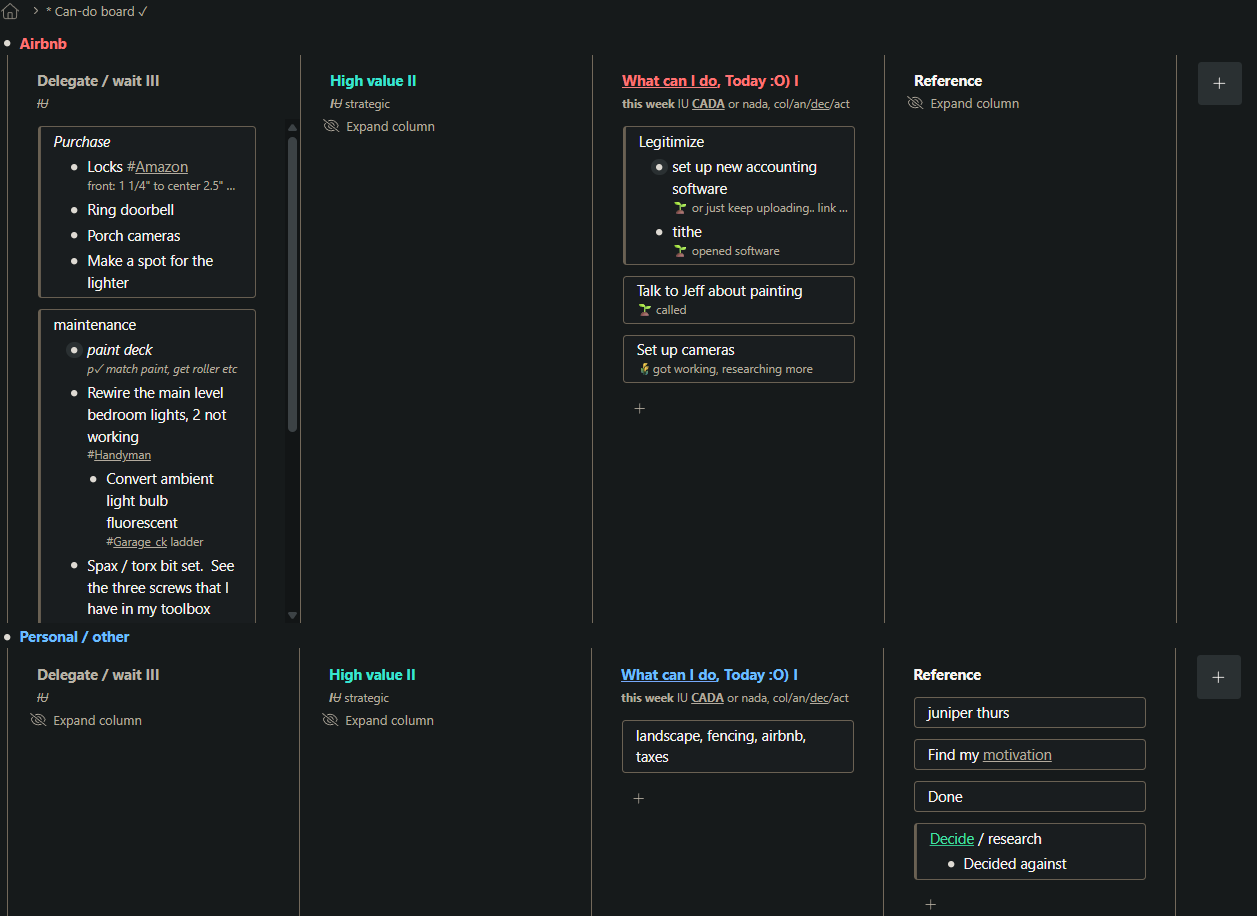
I use panes for kanban mostly, to-do lists for different roles in life. I try to keep topics shrunk within panes to that I can see what’s most important at a glance, and move topics to ‘today’ when it’s time to work on them. I like how the pane height is limited but that it shrinks when it doesn’t need full height.

Answers:

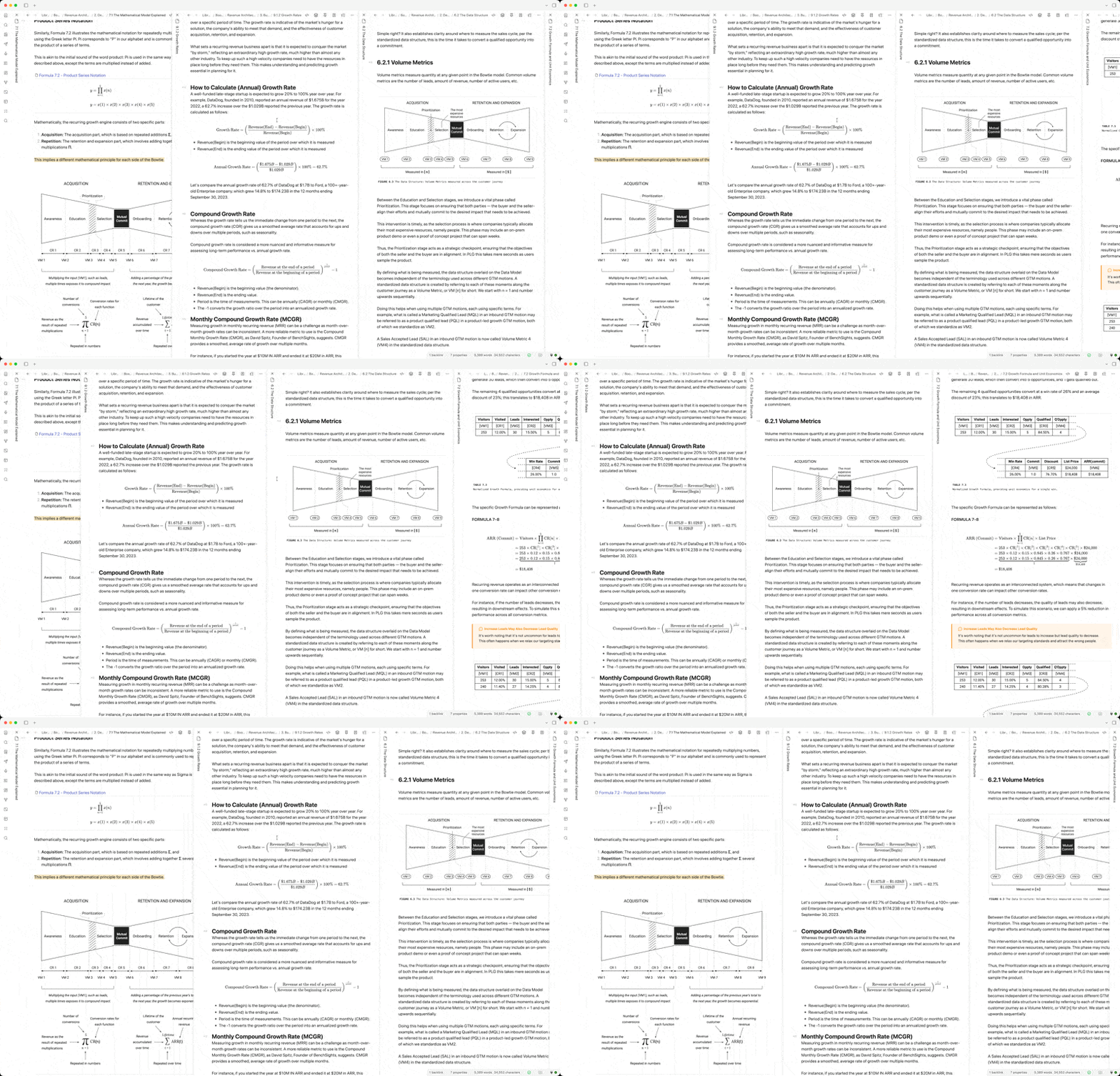
  1. See screenshot
  2. Existing panes stay same width, scroll beyond window if needed
  3. Neighboring pane keeps width when resizing. I resize panes for readibility, it would be a ‘pain’ if another pane messes with that

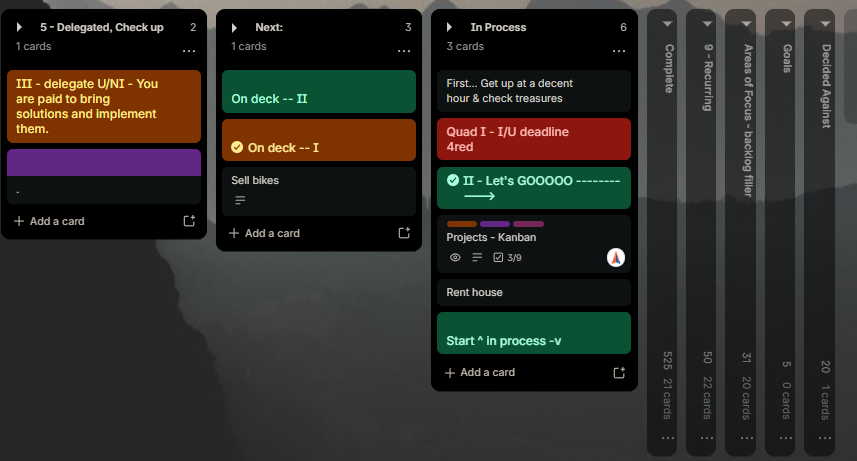
One thought: I’ll also collapse panes to focus on ‘today’, it can be distracting to have all the other info yelling at me when I don’t need it, so I have a plug in I love for trello which collapses a pane and pane title reads vertically, making it very efficient with space. I don’t use trello anymore because wf is much more versatile. To be clear, I don’t think wf needs this super-collapse, or there may be another way of narrowing on close, I know it is hard keeping the scope small on a feature but thought it’s helpful to see how people use panes in other contexts.

krzmig/strelloids: Browser extension for Trello that adds new features.

When I drag a divider to make a pane wider, I expect the left divider keeps fixed and drag right one to make it wider.

Please consider the above for both horizontal and vertical panes, potentially.

I’d keep Kanban board as another option to behave differently, and be scrollable. Also consider what to do with Dashboard feature.

Why not use the Kanban board for kanban? If Kanboard board were to fit your needs, ideally Panes could behave like panes on other apps, more like a window divider.

I think we may be talking about slightly different features: your screenshot shows board columns, while this thread is about panes, the separate views you can open side by side, each with its own breadcrumbs and navigation.

Would you expect pane widths to stay unchanged too, or were you thinking specifically of board columns?

  1. 3 panes - 1) calendar for current day, 2) Timeblocking pane 3) Personal Outline (focus) for my notes

    I keep these all visible throughout my day

  2. Yes, this is preferred. I do wish I could make my center pane smaller than the smallest currently allowed. My Time block pane has five panes which I scroll to for the proper day. Maybe there is a better way, but I cannot make the center pane narrower than is currently allowed.

    All panes to resize so they remain visible within the current window? No.

    I would like the new pane to let me choose what loads by default. Rather than having to search for the items to display.

  3. I prefer the other panes get narrower to make room, so everything stays within the current window.

Just to clarify, do you mean the pane to the left of the divider changes width, while the pane to its right keeps its width and moves sideways?

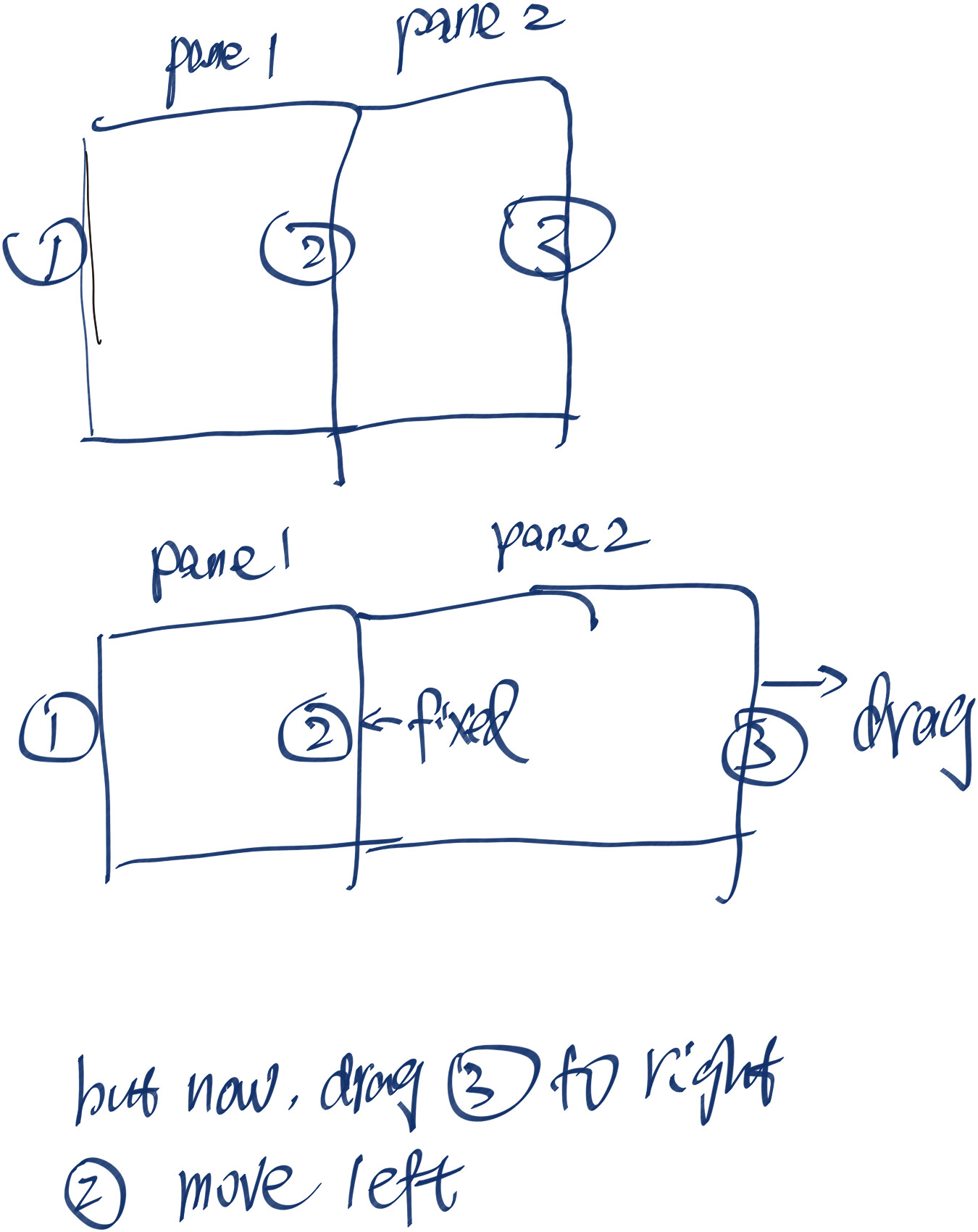
    • I have two adjacent panes: Pane 1 (bounded by divider ① and divider ②) and Pane 2 (bounded by divider ② and divider ③).
    • I want to expand/widen Pane 2.
    • When I drag divider ③ to the right, divider ② should remain fixed in place
    • When I drag divider ③ to the right, divider ② unexpectedly shifts to the left at the same time.

You can imagine the Mac finder’s column style resizing.

1 Like

@jacktalbert you are describing Boards | Workflowy Help

Ksenia’s question is about the fairly new feature Panes | Workflowy Help

1 Like

I’m using macOS Golden Gate. When you say Panes I want windows. I.e., separate windows that I can manage with my window manager (Moom in my case) to position as I want. E.g., three horizontal windows on the right half of my monitor.

(post deleted by author)

+1, also on the MacOS app

Or essentially panes that can be torn out to a separate window, emphasizing that I’d still want panes within the same window (as it is now), as a non-window manager user, but having separate windows would allow me to use Workflowy across multiple monitors.

I expect this to evolve, but currently, my routine setup is 3 panes: calendar journal (usually today), to-dos, and inbox (from mobile), all fitting in the window. I’ll frequently use the jump menu to briefly open a new pane (to consult or edit) to the right of whichever pane I’m in. So it works well for me that these two panes (starting and new) are visible together, and fine if the others are scrolled off while I work on these two, but easily focusable with mouse or hotkeys.

If I’m focused on a project, or meeting notes, I still typically use my pre-pane workflow to open it in a new browser tab (often in a smaller window so that I can tile with other docs, zoom, etc), but I’m starting to open this as a new pane, so I can quickly scroll back to my routine panes as needed, and so far I think that’s working well.

I frequently mirror from journal to project. When I do that, I’ll often use the post-mirror Shift+Enter to go to the destination, maybe reorganize a little, then use alt+left to go back to the journal.

Yes. See above. Specifically, it should open immediately to the right of the current pane (like now).

No; I don’t like to squish them. But if this did happen, then I would want them to return to previous size when I closed the new window.

Yes, in general. It would be nice (but not a priority) to be able to open a new pane at the far right, whether through a new command or indirectly via a command to go to the rightmost pane (followed by Alt+R).

Other panes keep their widths and move beyond the window.

P.S. I would like to be able to drag a pane to be unreadably small. For example if I want to see panes 1, 3, and 4 together, I could shrink pane 2. I know I can reorder them, but muscley memory likes each pane in its proper sequence. Again, not a huge deal.

Personally I don’t see the need of the horizontal scrolling: what’s the purpose of the panes when I can’t see them all, and dragging becomes a pain (scroll, drag, scroll…). So when I open a new pane, the others should equally shrink. Aldo, as @tschenyinkoh said, when I drag the rightmost bar, only the rightmost pane should resize.
I love this feature, keep it up!!

1 Like

Anywhere from 2–10 depending on what type of work I’m doing. I typically expect the pane in my first slot and whichever other one I have focused or last focused to stay visible together.

That said, it really depends on what type of working I’m doing. Sometimes I want most of the panes to collapse on one another such that I could slide through them Andy Matuschak style.

Sliding Panes in Obsidian

  • Existing panes to keep their widths, with horizontal scrolling to reach panes beyond the window?
    • This. ⇧ Think of it how the Column view in Finder works on Mac. Once you’re deep enough in a directory, you scroll horizontally to see the different panes.
  • All panes to resize so they remain visible within the current window?
    • Not this.

Yes. But there’s room for flexibility depending on modifier keys. e.g., in some apps I use, ✦ return opens the link in a new tab/sliding tab; whereas something like ⌘ ⇧ return would open it in a new pane to the right.

  • The neighboring pane gets narrower, keeping their combined width the same.
  • Other panes get narrower to make room, so everything stays within the current window.
  • Other panes keep their widths and move sideways, potentially beyond the window.

Both depending on what mode I have set. e.g. in Obsidian when I have stacked tabs on then other panes keep their widths and move sideways.

When I am using two different panes in Obsidian (which aren’t quite the same thing as tabs) then dragging a resize handle causes one to get wider while the other gets smaller.

1. What does your usual pane setup look like?

I have 6 layouts from 2 to 5 panes each that I have bookmarked. My default layout is two panes. I have some AHK that lets me hit Alt+X and then 1-6 to go to the layout of choice. The layouts are mostly combos of searches. I have had up to 9 layouts but I’ve settled back to the 6. All layouts have equal-sized panes.

I keep all panes of whichever layout visible when at my desk. I have a 34 inch monitor in one location and a 43 inch monitor in another. The AHK discussed above automatically changes the window width based upon which layout it is. If I am on the laptop, I can see 5 but obviously the lists become longer. And a canned horizontal scroll on the laptop if need be.

2. When you open another pane, what do you expect to happen?

Typically I only open a new pane when I’m in the base 2 pane layout. I do not change pane widths. When I open a new pane or link to a new pane, I would like the screen to show everything and have the panes be of equal width. So 3 panes, 1/3 window, 4 panes, 1/4. And once the added panes reach minimum width, if I were to add another have it be off window to the right at minimum width, whatever that is. As I remember, this is how adding panes worked initially. If I do add a pane to one of the other layouts, I would like it to be added in the same fashion.

For my use case, as I use the layouts to get to the setup that I want, I really don’t have a need to change the widths of the panes. And if I did change a width I wouldn’t add panes there as I would have changed widths for a purpose. But if I did change widths and found myself adding panes regularly I would just add another layout with the added pane. I am not much on fiddling.

3. When you drag a divider to make a pane wider, what do you expect?

Not my expertise as I don’t change width. But spitballing:

If all panes are staying in the window then dragging left makes left pane narrower and right pane wider. Dragging right left pane gets wider and right pane gets narrower.

If panes go off screen, In the focused pane, drag left edge to the left widens and to the right narrows. Drag right edge to the right widens and to the left narrows. All other panes stay as is.

=================

I use bookmarks for pane management and workflow. As such, I’m bouncing in and out of the different layouts. If I do add a pane, I want it to show up on the right, adjusting all panes to the same size even if it is off-screen. Equal size panes simplify getting my bearings as I bounce.

I really don’t have a need to adjust pane widths at this point. Not to say that there isn’t a use case where I’ll want a thinner pane in the future. But if it were to happen I would just bookmark the layout and not be adding any panes to it on the fly. But that’s just me.
Thanks! For me:

Usual pane setup

  1. 2-3 panes with one being the “focus” pane where I’m doing most of my work and referencing the contents of the others with occasional edits in the other panes.

  2. Since I’m usually really focused on 2-3 panes, preferably for me they are all visible at once.

**What I expect when opening a new pane
**

  1. Existing panes to keep their width within reason.

  2. For my workflow(s) all panes resizing so they remain visible when practical, otherwise, once panes become too narrow to be practical, for the horizonal scroll to enter the equation.

  3. For me, I would prefer this functionality across all UI elements.

**What I expect when dragging a divider to make a pane wider
**

  1. I would expect that the neighboring/other panes to become narrower to make room so everything stays within the current window. If this is the case, I would expect that there is a minimum width on the pane or panes that gets/get narrower. As the number of panes grows, eventually I would expect the other panes to keep their widths and move sideways beyond the window.

Thanks!