Rudimentary API: Try using it and tell me what you think

We’ve got several API endpoints going:

/api/beta/get-item/

/api/beta/list-children/

/api/beta/complete-item/

/api/beta/uncomplete-item/

/api/beta/create-item/

/api/beta/edit-item/

/api/beta/delete-item/

If you are interested in WorkFlowy having an API, please try to build what you want using this API.

Please show me examples of your own code, in the language you prefer — show me how you interact or how you want to interact with the API, where the API works and where it’s falling short.

Even if you can’t build what you want with the current API — show me how you imagine the code would look like in the ideal world.


Your API key can be found here: https://beta.workflowy.com/api-key/.

UUIDs of the items (nodes) can be found by inspecting the DOM:

Examples

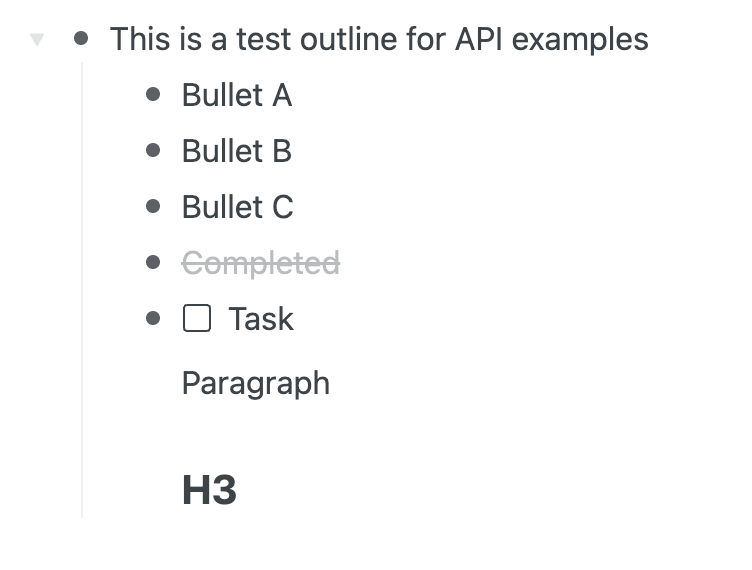
All examples were executed against this outline:
Get an item details

curl -X POST https://beta.workflowy.com/api/beta/get-item/ \
    -H "Content-Type: application/json" \
    -H "Authorization: Bearer <YOUR_API_KEY>" \
    -d '{"item_id": "<UUID_OF_AN_ITEM>"}' | jq
{
  "item": {
    "id": "6ed4b9ca-256c-bf2e-bd70-d8754237b505",
    "name": "This is a test outline for API examples ",
    "note": null,
    "priority": 200,
    "data": {
      "layoutMode": "bullets"
    },
    "createdAt": 1753120779,
    "modifiedAt": 1753120850,
    "completedAt": null
  }
}

Get children of your Home (Root) item

curl -X POST https://beta.workflowy.com/api/beta/list-children/ \
    -H "Content-Type: application/json" \
    -H "Authorization: Bearer <YOUR_API_KEY>" \
    -d '{"item_id": "None"}' | jq
{
  "items": [
    // ...
  ]
}

Get children of an item

curl -X POST https://beta.workflowy.com/api/beta/list-children/ \
    -H "Content-Type: application/json" \
    -H "Authorization: Bearer <YOUR_API_KEY>" \
    -d '{"item_id": "<UUID_OF_AN_ITEM>"}' | jq
{
  "items": [
    {
      "id": "ee1ac4c4-775e-1983-ae98-a8eeb92b1aca",
      "name": "Bullet A",
      "note": null,
      "priority": 100,
      "data": {
        "layoutMode": "bullets"
      },
      "createdAt": 1753120787,
      "modifiedAt": 1753120815,
      "completedAt": null
    },
    {
      "id": "967ae17d-33d5-31d9-4c6a-0c191001e74a",
      "name": "Bullet B",
      "note": null,
      "priority": 200,
      "data": {
        "layoutMode": "bullets"
      },
      "createdAt": 1753120789,
      "modifiedAt": 1753120817,
      "completedAt": null
    },
    {
      "id": "17d78cb4-8c38-d400-d626-308f438ad7d3",
      "name": "Completed",
      "note": null,
      "priority": 350,
      "data": {
        "layoutMode": "bullets"
      },
      "createdAt": 1753120845,
      "modifiedAt": 1753120850,
      "completedAt": 1753120846
    },
    {
      "id": "88729243-d7bd-a57e-a3f5-d676ad0f7e2b",
      "name": "Paragraph",
      "note": null,
      "priority": 500,
      "data": {
        "layoutMode": "p"
      },
      "createdAt": 1753120822,
      "modifiedAt": 1753120825,
      "completedAt": null
    },
    {
      "id": "73c34c19-81bf-e6c7-fe3c-6b944888ff78",
      "name": "H3 ",
      "note": null,
      "priority": 600,
      "data": {
        "layoutMode": "h3"
      },
      "createdAt": 1753120825,
      "modifiedAt": 1753120833,
      "completedAt": null
    },
    {
      "id": "d5d6ca34-70c6-fa48-cb95-629bd6b2e333",
      "name": "Bullet C ",
      "note": null,
      "priority": 300,
      "data": {
        "layoutMode": "bullets"
      },
      "createdAt": 1753120790,
      "modifiedAt": 1753120821,
      "completedAt": null
    },
    {
      "id": "30bf0f45-4f2a-b0e5-8a70-10acf59be645",
      "name": "Task",
      "note": null,
      "priority": 400,
      "data": {
        "layoutMode": "todo"
      },
      "createdAt": 1753120799,
      "modifiedAt": 1753120822,
      "completedAt": null
    }
  ]
}

NOTE: The list isn’t ordered, you need to order it yourself based on the priority field.

Complete an item

curl -X POST https://beta.workflowy.com/api/beta/complete-item/ \
    -H "Content-Type: application/json" \
    -H "Authorization: Bearer <YOUR_API_KEY>" \
    -d '{"item_id": "<UUID_OF_AN_ITEM>"}' | jq
{
  "status": "ok"
}

Un-complete an item

curl -X POST https://beta.workflowy.com/api/beta/uncomplete-item/ \
    -H "Content-Type: application/json" \
    -H "Authorization: Bearer <YOUR_API_KEY>" \
    -d '{"item_id": "<UUID_OF_AN_ITEM>"}' | jq
{
  "status": "ok"
}

Add a child to the top of an item

curl -X POST https://beta.workflowy.com/api/beta/create-item/ \
    -H "Content-Type: application/json" \
    -H "Authorization: Bearer <YOUR_API_KEY>" \
    -d '{"parent_id": "<UUID_OF_AN_ITEM>", "name": "Hello API", "position": "top"}' | jq
{
  "item_id": "5b401959-4740-4e1a-905a-62a961daa8c9"
}

Add a child to the bottom of an item

curl -X POST https://beta.workflowy.com/api/beta/create-item/ \
    -H "Content-Type: application/json" \
    -H "Authorization: Bearer <YOUR_API_KEY>" \
    -d '{"parent_id": "<UUID_OF_AN_ITEM>", "name": "Hello API", "position": "bottom"}' | jq
{
  "item_id": "5b401959-4740-4e1a-905a-62a961daa8c9"
}

Edit an existing item

curl -X POST https://beta.workflowy.com/api/beta/edit-item/ \
    -H "Content-Type: application/json" \
    -H "Authorization: Bearer <YOUR_API_KEY>" \
    -d '{"item_id": "<UUID_OF_AN_ITEM>", "name": "New Name"}' | jq
{
  "status": "ok"
}

Delete an item

curl -X POST https://beta.workflowy.com/api/beta/delete-item/ \
    -H "Content-Type: application/json" \
    -H "Authorization: Bearer <YOUR_API_KEY>" \
    -d '{"item_id": "<UUID_OF_AN_ITEM>"}' | jq
{
  "status": "ok"
}
12 Likes

Success! I used this API to create a task beneath my Inbox node. No suggestions for improvement so far. This endpoint behaved exactly as I’d hoped, and the item_id property in the response gave me what I need for the next steps.

On my side, this was a bit of a hack, so I’ll have to tidy things up a bit to support both Workflowy and Dynalist during the transition. Once that’s done I should be able to try the other endpoints.

Is there a way to get the children of the root node? Your private protocol seems to use a pseudo ID of “None” sometimes, but that didn’t work here ("code":"not_found"). I also tried empty string and “/”. If there’s a special item ID for the root node, I wasn’t able to discover it in the DOM or by spying on the network.

Dynalist has a separate API endpoint for this (file/list). I don’t like that approach and it’s mostly an artifact of their decision to treat children of the root differently. For Workflowy, I’d prefer that the list-children end point handle the job when I pass an item_id that refers to the root node.

It’d be convenient if create-item allowed a priority property. Something like 0 (assign the minimum priority), -1 (assign the maximum priority), or a specific priority that I provide (presumably my code calculated this by calling list-children and examining each priority property).

My immediate use case is for 0 and -1 since I sometimes want new items at the top and sometimes at the bottom. Down the road, I’ll want to create a child item in between two specific siblings. I probably won’t care about the exact priority number though, just “top” or “bottom” or “between A and B”.

All feedback makes perfect sense so far (including the clarification about backups from the other thread) — we’ll address it.

Listing children of the root node seems to be impossible now — if you knew its ID, you’d be able to list its children, but I don’t think there is a way to obtain the root ID. We’ll address this use-case too.

If you have anything else — bring it on. Your feedback is very constructive.

2 Likes

@mndrix Okay, I’ve added two examples:

  1. Getting children of your Home (Root) item. TLDR: pass “None” as item_id
  2. How to define whether the created item gets to the top or to the bottom of the parent item. TLDR: position: "top" | "bottom".

We’re also deliberating on the export functionality - the team really doesn’t want to encourage API users to pull their entire trees whenever they feel like doing so, but they’ll settle on some solution sooner or later.

2 Likes

Thanks. I’ve updated my code to use both item_id="None" and the new position argument. Both worked exactly as expected and fit nicely on my side.

I reworked my Dynalist OPML export code so that a future Workflowy API should slot in easier. I look forward to seeing what the team comes up with for the backup use case.

Okie-dokie, please try:

curl -v https://beta.workflowy.com/api/beta/list-all/ \
    -H "Content-Type: application/json" \
    -H "Authorization: Bearer <YOUR_API_KEY>"

It just lists all your items in a flat JSON array. The rate limit for this particular endpoint is 1 request / hour.

1 Like

Just finished integrating this list-all endpoint into my backup-to-OPML tool and it works great. To avoid rate limits, I worked with a quick JSON dump, but any integration problems at this point are my own fault.

Speaking of rate limits, it might be nice if the rate limit were implemented as a token bucket with capacity ~10 that refilled at a pace of 1 token per hour. The effective rate would be the same, but more forgiving of any fleeting errors that might require a manual retry.

1 Like

Hi there! I’d really like to have the ability to find all the todo nodes, and get their details.

Right now I could get it to work if I start recursively walking the entire node tree from the root, however that’s a rather inefficient way of doing it. And I am worried I might hit into rate limits if this were real world production.

Even better if I can filter in my query to only query todos that are modifiedAt beyond a certain date, so I can do one initial complete load and then only query for deltas since my last query.

So something like:

POST /api/beta/search-items/
Content-Type: application/json
Authorization: Bearer

{
“filter”: {
“data.layoutMode”: “todo”
}
}
// optional: only return items modified strictly after this UNIX‐epoch seconds
“modifiedAfter”: 1753854991

Let me know if I need to explain myself better.

The purpose is I want to integrate WorkFlowy with this todo ‘front end’ app I’m building (www.taskslicer.com)

1 Like

This list-all API call triggers a “maximum response size reached” error for me, which doesn’t surprise me as a longtime workflowy user. :wink: Of course I can get it to work if I use a dummy account.

The team insists we don’t have a limitation like that on our side. They insist it’s something on your side! I don’t believe them, they’re probably lying, but can you please double-check if it’s not an issue on your side?

I’m using postman to make the API call. If I look carefully it looks like it starts enumerating a response before then settling on this error. I then wanted to screen record it, but of course I can only do this API request once an hour :slight_smile:

My workflowy backup txt file is 47.88 MB to give an idea about the size of the account.

Here’s the console output. Let me know if you want a screen recording too.

GET https://beta.workflowy.com/api/beta/list-all/: {
  "Error": "Maximum response size reached",
  "Request Headers": {
    "content-type": "application/json",
    "authorization": "Bearer #####################",
    "user-agent": "PostmanRuntime/7.43.3",
    "accept": "*/*",
    "cache-control": "no-cache",
    "postman-token": "###############",
    "host": "beta.workflowy.com",
    "accept-encoding": "gzip, deflate, br",
    "connection": "keep-alive"
  }
}
GET https://beta.workflowy.com/api/beta/list-all/: {
  "Network": {
    "addresses": {
      "local": {
        "address": "##########",
        "family": "IPv4",
        "port": 53189
      },
      "remote": {
        "address": "#############",
        "family": "IPv4",
        "port": 443
      }
    },
    "tls": {
      "reused": false,
      "authorized": true,
      "authorizationError": null,
      "cipher": {
        "name": "TLS_AES_256_GCM_SHA384",
        "standardName": "TLS_AES_256_GCM_SHA384",
        "version": "TLSv1/SSLv3"
      },
      "protocol": "TLSv1.3",
      "ephemeralKeyInfo": {},
      "peerCertificate": {
        "subject": {
          "commonName": "workflowy.com",
          "alternativeNames": "DNS:*.workflowy.com, DNS:workflowy.com"
        },
        "issuer": {
          "country": "US",
          "organization": "Let's Encrypt",
          "commonName": "E6"
        },
        "validFrom": "Jul  9 00:08:48 2025 GMT",
        "validTo": "Oct  7 00:08:47 2025 GMT",
        "fingerprint": "######",
        "serialNumber": "###############"
      }
    }
  },
  "Request Headers": {
    "content-type": "application/json",
    "authorization": "Bearer ############################",
    "user-agent": "PostmanRuntime/7.43.3",
    "accept": "*/*",
    "cache-control": "no-cache",
    "postman-token": "########################",
    "host": "beta.workflowy.com",
    "accept-encoding": "gzip, deflate, br",
    "connection": "keep-alive",
    "cookie": "_bess=b4aa1664ae141e65"
  },
  "Response Headers": {
    "server": "nginx",
    "date": "Thu, 31 Jul 2025 08:07:31 GMT",
    "content-type": "application/json",
    "content-length": "53",
    "connection": "keep-alive",
    "content-security-policy": "default-src *  data: blob: filesystem: about: ws: wss: 'unsafe-inline' 'unsafe-eval' unsafe-dynamic",
    "referrer-policy": "same-origin",
    "service-worker-allowed": "/",
    "set-cookie": "_bess=e21965ec0071739e; Path=/",
    "strict-transport-security": "max-age=31536000; includeSubDomains; preload",
    "vary": "Cookie, Origin",
    "x-content-type-options": "nosniff",
    "x-frame-options": "SAMEORIGIN",
    "x-xss-protection": "1; mode=block"
  },
  "Response Body": "{\"error\": \"Rate limit exceeded\", \"retry_after\": 2930}"
}

According to Postman documentation, the default response size limit is 50mb.

So you can either try to change this in Postman’s settings or just use curl.

Can we get shortcut information in the list-all response? Since a node appears capable of only one shortcut at a time, maybe a "shortcut" : null | string property on each object in the items array; or "shortcut" that’s only present when the node has a shortcut.

I’m starting to experiment with shortcuts. They look very promising for my workflows, but I noticed that they’re not available for backup through the API. Presumably Dropbox backup already includes them, but I don’t use that.

You’re right!, I was just making a screen recording and then I noticed there is an option to change the response max size… I’ll set it to unlimited and try again later. For everyone else, in Postman > General > Max response size, you can set it to 0 to make it unlimited.

This is HUGE. Thanks

3 Likes

@anatoliy
Where to find all the properties?
In particular the layoutMode?
thanks

edit: another question…what is the property “priority”??

@anatoliy
how to insert bullets inside the main bullets we are going to create?

I don’t think the properties are documented anywhere yet. If you call list-children with item_id set to "None" then you can see the JSON for some items in your tree then reverse engineer what each of the properties means.

I haven’t played with layoutMode much yet, but my guess is that it corresponds to the “Turn Into …” menu item in the web app.

The priority defines the order of an item within its parent. Smaller priority numbers sort towards the top of the list.

When you call create-item, include a parent_id property in the JSON for the new item. That puts your new item inside the parent one.

Thanks.
The idea to creat sub bullets was immediately with the same actions not later.
I ma used to do that with Apple shortcut API**
**