Share your setup

Curious what everyone’s setup looks like. I invite you to share a peek with the community. I’ll start.

It’s pretty simple after years of overcomplicating things with boards and various dashboards. Just a top section that holds:

  1. Inbox - Only place where all my quick capture go, makes it easy to only have one place to review triage things from.
  2. Daily - Node that holds my main ‘view’. It’s what’s open in a tab most of the day.
  3. Folders - Where everything else lives, notes, docs, projects, etc.
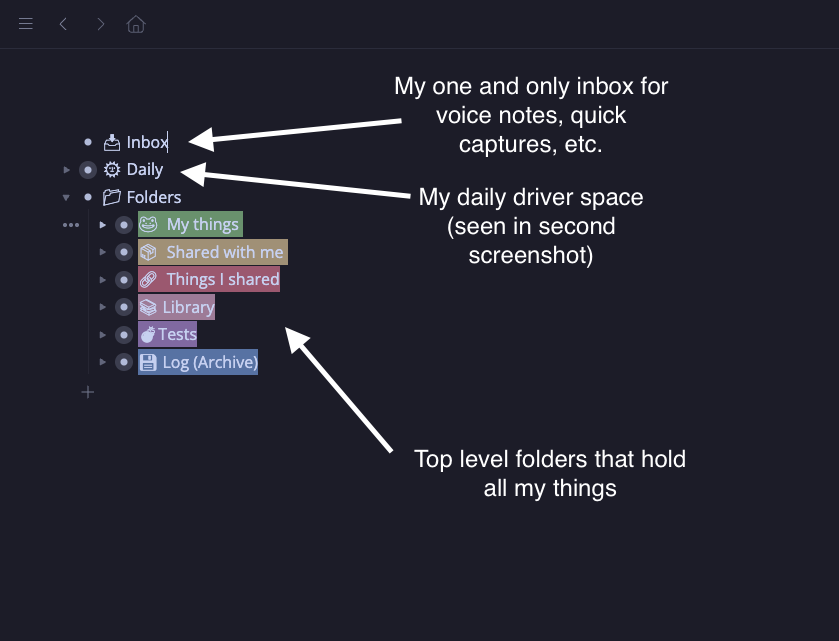
Here’s where I work from most of the day.
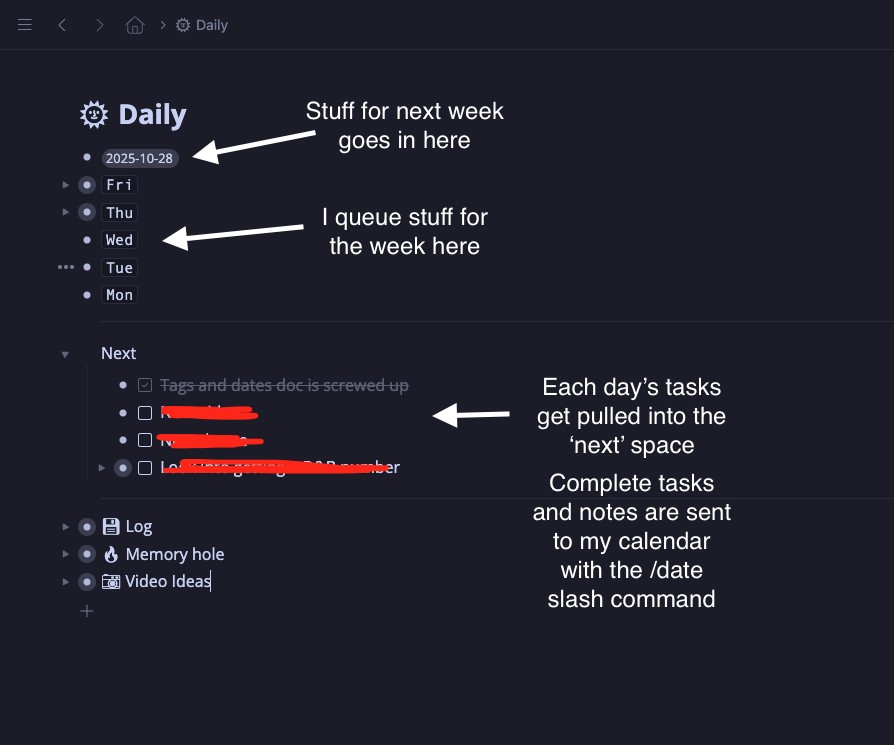
Things kind of trickle down:

  • Future stuff (procrastination) gets put into a ‘next monday’ node that I look at each monday
  • Day nodes hold things I want to look at for each day
  • Next section is my daily todo/notes list, things here get sent to my calendar via the /date slash command (This is how I create a log of everything I’ve done and any important notes for posterity)
  • The log is a vestige from before I started using the calendar feature, I need to dump this in the calendar and have it auto sort everything at some point.
  • Memory hole is a ‘not important, not doing this - still want to have a record of it’ place
  • Video ideas should really go in my folders, I need to move it
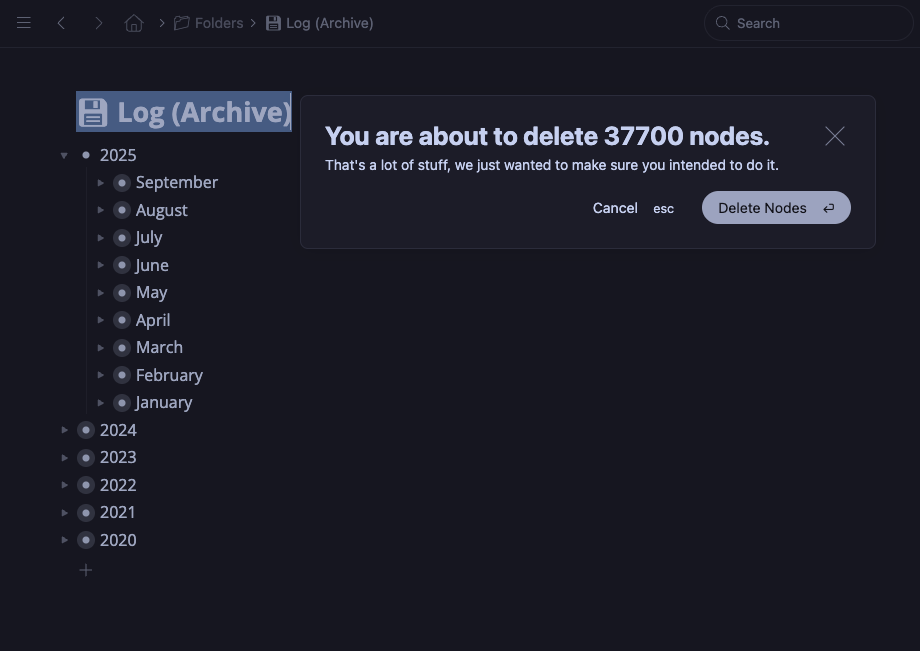
I was curious about how much I had in my manual calendar, the ‘Log (Archive)’ thing in my folders section (That’s ~17 items per day on average, counting Saturdays and Sundays, just todos - no notes, projects or anything else).
15 Likes

Good to see! Thanks for sharing, @rodolfo.

1 Like

Thanks for starting this thread @rodolfo. I will be interested in seeing other people’s set ups and maybe finding ways to improve my own.

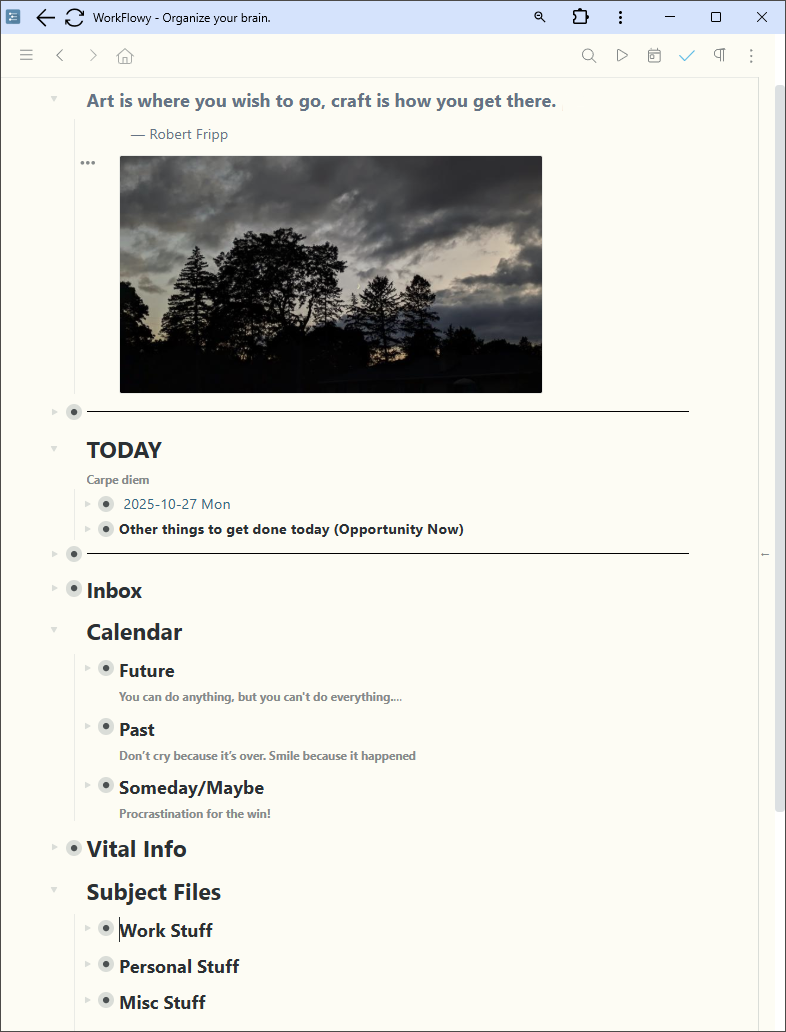
I use a variation on the WF Timeline System. I don’t get into quite the detail in planning my day as Frank does, but I do use WF dates to keep things organized day by day.

The top node is TODAY, where I use a WF shortcut to move the current day’s node every morning. I also have a second node of things that need to get done someday soon (based on Michael Linenberger’s 1MTD system).
I don’t use my INBOX that much. It becomes an unorganized catch-all. I prefer to place things directly into the next available day I can deal with them. But things do go into the INBOX when I use quick capture on my phone.
The CALENDAR node contains Future dates, Past dates (including meeting notes that are filed by date with a tag for searching) and my Someday/Maybe list. The Future node also has a master list of all my repeating tasks, which I tag with #repeat-frequceny tags (e.g. #repeat-weekly-T for a weekly repeating task which occurs on Tuesday). When I complete the task, I duplicate it and move it to the next instance. I am hoping a built-in repeating task system will be developed in WF soon!
The last two nodes are my knowledge base. Vital Info is a ready reference section for quick retrieval info, such as WF keyboard shortcuts I’m trying to learn or a coworker’s newborn infant’s name I want to remember. Subject Files are organized by area and contain longer term info. It is my legacy filing system before I developed my current WF date-driven system. But with WF’s search and filter capabilities, I don’t really need to worry about refiling any of it.

I developed this system over the summer, just before WF’s new built-in Calendar arrived. I was using TeuxDeux before this, which is also date driven. A quick flirtation with Twos and reading Frank’s WF Timeline book showed me this would be easy to set up in WF. Moving to WF allows me to have more info at my fingertips and the benefits of an infinite nested list along with the date-driven todo system.

I have not started to use the new WF Calendar yet since I don’t see any immediate advantage. I use WF shortcuts to quickly move nodes to/from the TODAY, Future and Past nodes. If (hopefully when!) WF creates repeating tasks, and assuming it uses the new WF Calendar, I will then move everything there.

For those still reading and interested, the quote at the top is for inspiration from one of my favorite musicians and the photograph is one I took and I occasionally swap it out for something else when I want a fresh perspective.

6 Likes

Hello,

I’ve set up a fairly simple system, but one that I find genuinely effective in my daily work. I’m always looking for small ways to refine it.x

![|605x294](file:///C:/Users/BERTRA~1/AppData/Local/Temp/msohtmlclip1/01/clip_image002.png)

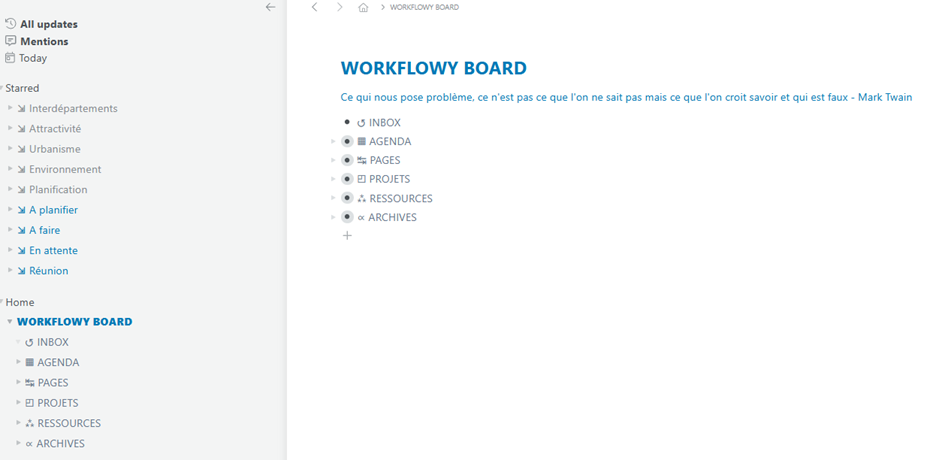
INBOX – I use it very little. Its main purpose is to collect messages sent from Fredbot on my smartphone — very handy for jotting down an idea while walking or on the train. Otherwise, I prefer to process information as it comes and make micro-decisions right away. In the end, piling things up in an inbox tends to create more friction than clarity.

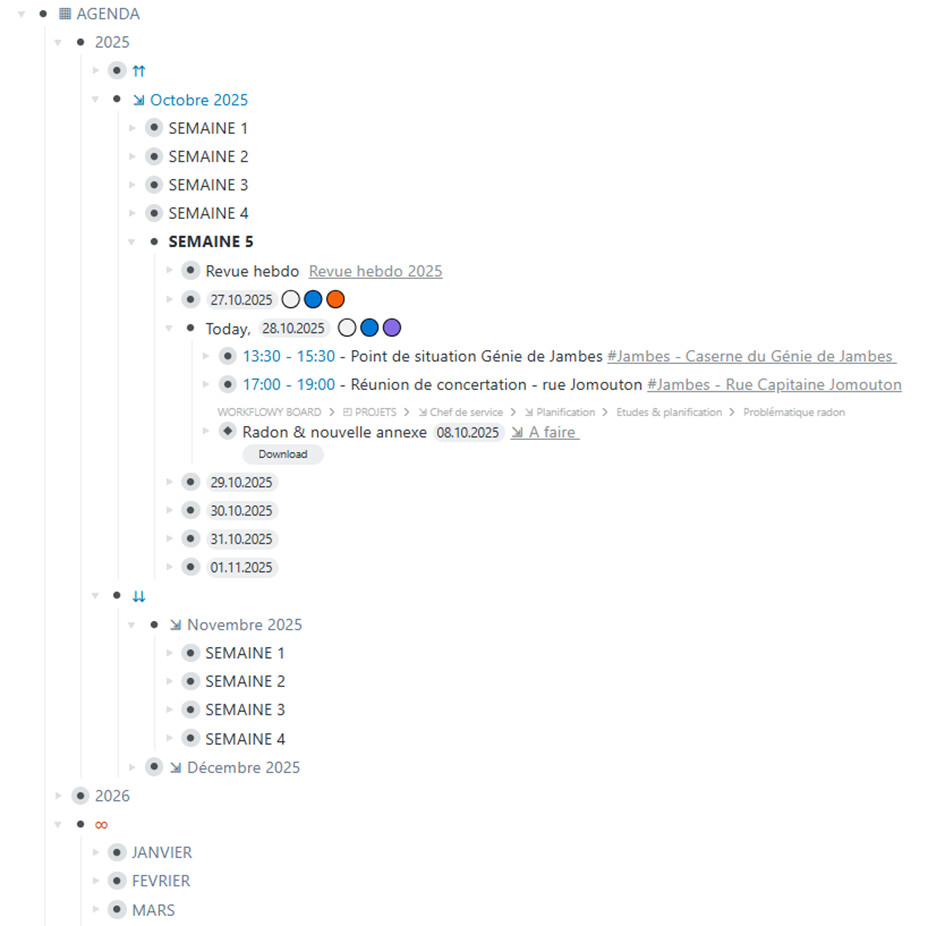
AGENDA – I recently started using Workflowy’s date system. Its main advantage is flexibility: items can be easily moved around in the calendar. My setup is quite classic and loosely based on Frank D.’s model, though my days are less detailed and more focused on priorities than on strict scheduling.

![|605x592](file:///C:/Users/BERTRA~1/AppData/Local/Temp/msohtmlclip1/01/clip_image004.png)

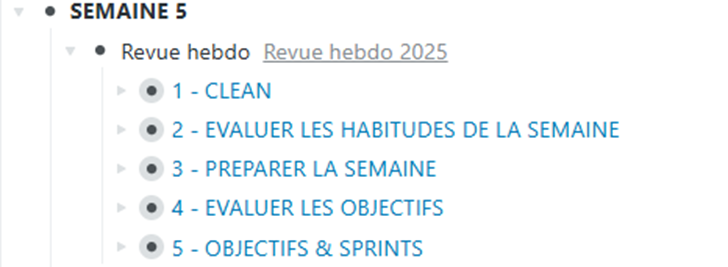
The start of the week is dedicated to my weekly review, a key ritual I try to protect. It follows five steps: reviewing active projects, updating the agenda, sorting the inbox, adjusting priorities, and clarifying the week’s actions.

![|466x171](file:///C:/Users/BERTRA~1/AppData/Local/Temp/msohtmlclip1/01/clip_image005.png)

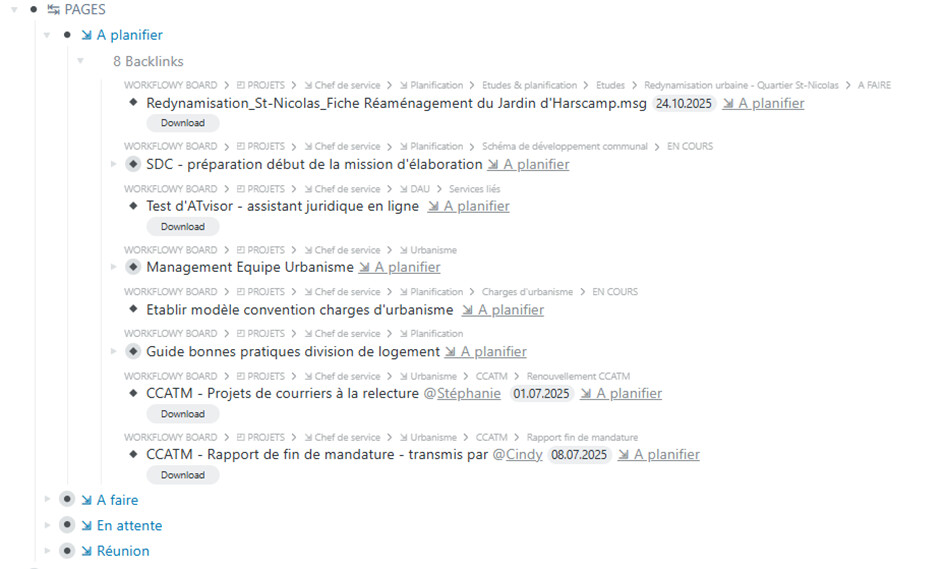
PAGES – This section is inspired by Roam Research. It’s divided into four parts: To plan, To do, Pending, and Meetings. Each section brings together bidirectional links pointing to related actions or projects. This system works as a kind of dashboard: it gives me a transversal view of everything and makes it easy to turn ideas into concrete actions.

![|605x364](file:///C:/Users/BERTRA~1/AppData/Local/Temp/msohtmlclip1/01/clip_image007.png)

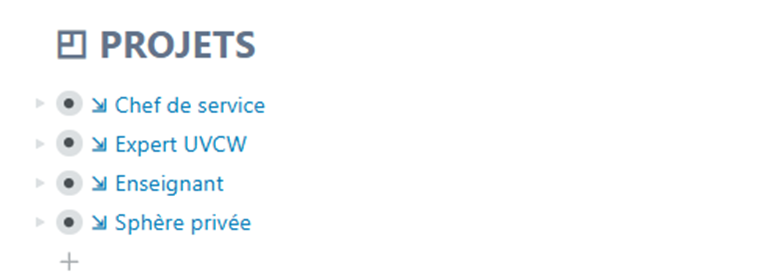
PROJECTS – This area corresponds to my four main areas of responsibility. Each one contains several projects, structured in three categories: To do, Done, and Resources. Each project is linked to the agenda through bidirectional connections that reference related meetings or deadlines. The active tasks appear in the To do section and link back to PAGES, ensuring smooth navigation between different levels.

![|502x179](file:///C:/Users/BERTRA~1/AppData/Local/Temp/msohtmlclip1/01/clip_image008.png)

![|605x79](file:///C:/Users/BERTRA~1/AppData/Local/Temp/msohtmlclip1/01/clip_image010.png)Finally, the last two sections gather RESOURCES — my working documentation — and ARCHIVES, where I store completed items and reference materials.

Overall, this setup gives me both clarity and flexibility: everything has its place, without unnecessary rigidity.

1 Like

2 Likes

Thank you for sharing!

here’s my setup.

4 Likes

I use Workflowy for a wide variety of purposes, including sharing resources in a large public library and tracking private client notes.

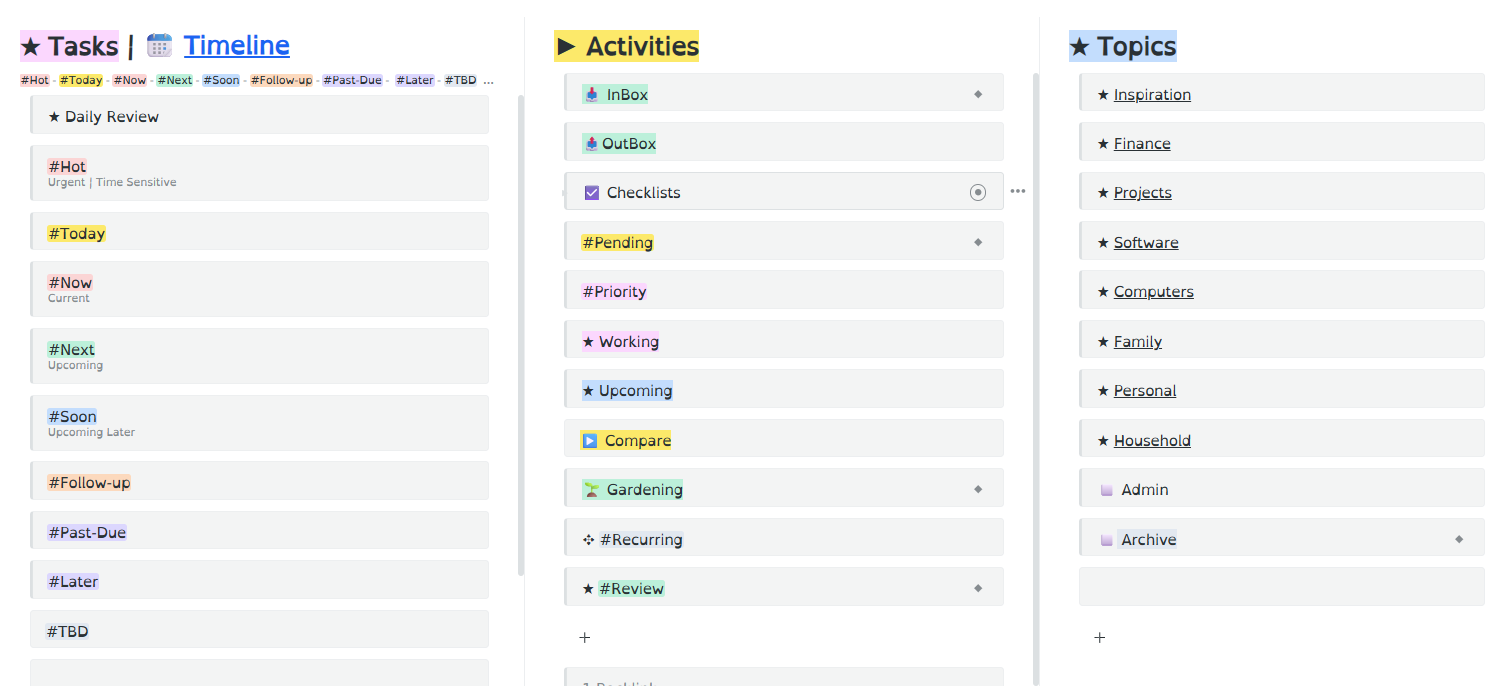
However, the main hub for all my daily activity is a dashboard I’ve created for task management which works very well for my purposes. The main benefit is that by working from this “task hub”, I’m usually only 1-3 clicks away from any current task within my database.

For those who are interested, I’ve included a screenshot below ~ and if anyone would like more details, just let me know. More details are also included in my follow-up replies below.

3 Likes

Thansk for sharing @Metta! I would like to know more. How do you work with this system on a day-to-day basis? Is there any organisation within your Topics?

As this is your task manager (amazing, by the way), how do you integrate it with your notes, journal, etc. (if you have them)?

Thank you!

1 Like

You’re most welcome, @patricia17almeida ~ and my apologies for the delay in getting back with you. I’ve been under the weather recently, and it’s taken me a few days to get caught up with my personal correspondence.

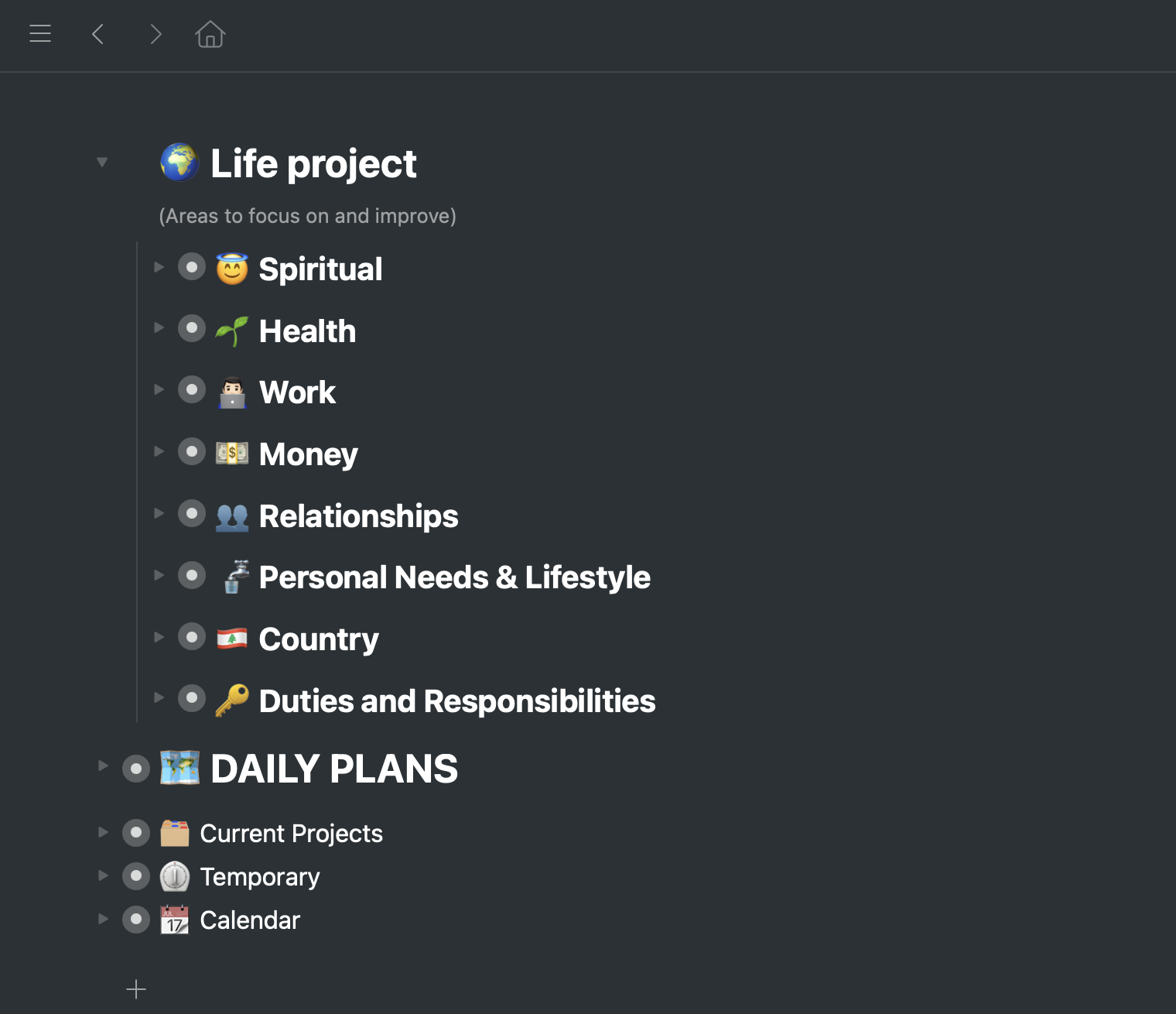
However, I hope to have more time this week (if not later today) to provide a few more details about the “task hub” dashboard I use for managing all my tasks in WF. (This task hub is set-up using WF’s “fractal board” feature.)

In the meantime, to answer your initial question, yes: I do have an organizational structure inside of each of the main Topics in the far right-hand column. However, you can set up this internal structure however you prefer.

For example, this cheat sheet from the Forever*Notes system might give you some ideas for how to organize this Topics section.

Just keep in mind the purpose of each of the 3 main sections in this task hub:

  • Topics (far right) is the home for everything task-related, including all relevant planning notes, resources, links and ideas. Think of this area as the main “home” for ALL of your projects and tasks, and be sure to assign whatever tags you prefer to your tasks.
  • Activities (center) will be the dynamic area of the task hub where you organize incoming tasks, and ID current (active) projects from which you will select items to be put on your “next actions” list
  • The Task List (far left) will function as your “next actions” list, organized by urgency. These action items will all be mirrored (or linked to) selectively from within their “home” in the main Topics area.
  • FYI, I only use the Timeline as an historical log of personal events and milestones in my life. I don’t use it at all for managing my tasks, since most of my current work is not heavily driven by dates. More importantly, I don’t want to have to leave my task hub to manage tasks buried within the timeline ~ and I don’t want to have be constantly rolling tasks forward from one date to another if/when my scheduling slides.

As for journaling, I do this in a completely separate, password protected app. This keeps my WF search results “clean” and limited to task-related items only. (For other journaling ideas, you might be interested in reviewing this Daily Journal Hub created by another WF user.)

I hope this helps, and I’ll do my best to provide more info soon.

1 Like

Okay, @patricia17almeida ~ I’ve created a much more detailed overview of my “Task Hub Dashboard”.

I hope this helps to explain how I set-up and use each of my “Task Hub” features, and if you have any additional questions, just let me know! :slightly_smiling_face::+1:

2 Likes

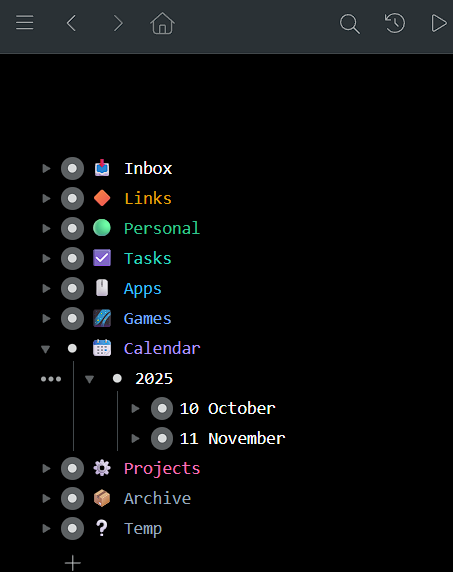
still messing around with categories / icons/ background color etc

i would like to use highlighting more but cant stand the sharp corners!
devs, if u r reading this, give us smooth highlights corners like inline code has pls lol

1 Like

@Metta Your response exceeded all my expectations; I’m truly grateful for your care and for making your system so comprehensive and inspiring. I’m still analyzing the particularities of how you organize yourself, and I will definitely steal some ideas! Thank you.

2 Likes

Hi @Metta! As a fellow heavy user of TheBrain, I am wondering where you draw the line between Workflowy and TheBrain. I’ve read in the past about your attempts to handle task management in TB so I’m wondering if that is mainly what you use Workflowy for? Do you also use a dedicated task manager? Thanks for any tips!

1 Like

Thanks for confirming receipt, @patricia17almeida . I’m glad if these resources might be helpful. If you have any questions, do let me know ~ and I’ll be interested to see whatever system you eventually decide to set-up for your own use.

Best of luck! :four_leaf_clover:

1 Like

Nice to see you here, Tom! @tcallaghan :slightly_smiling_face:

As you’ll see in my 2 main posts above, WF is my primary task manager, and I’ve now limited my use of TheBrain to general information management.

Try as I might, I never could find a good way to use TB for task management, for a wide variety of reasons:

I wanted to be able to view a large number of tasks at one time ~ but in TheBrain, no matter how many tasks I linked to a central hub, I could only view one note at a time.
– In contrast, WF allows me to open and and close as many outline items as I want, in order to expand the view of my task dashboard as much and as deeply as I want.

I wanted to create a dashboard that would allow me to access virtually any task within 1-3 clicks. My “task hub” in WF has allowed me to do exactly that.
– In contrast, with TheBrain I always had to trade off between deep nesting (which hides tasks) or a dense single level display, which ends up with truncated thought names that are not easy to read, and I lost the benefit of having deep nesting. In WF I get both: easy to read tasks, along with deep nesting (i.e., strategic organization).

I wanted to reorder tasks quickly and easily. WF allows me to do exactly that with a simple drag/drop. Such simple (manual) reordering is just not possible in TheBrain.

I wanted to be able to filter tasks in place, without losing context ~ which is also not possible in TheBrain.

Best of all, WF allows me to mirror content in multiple locations which provides great flexibility for both organizing and viewing tasks. In fact, this is, IMHO, the best feature in WF, hands down. Plus, WF also provides the quick Move To and Mirror To features which provide for a much smoother, time-saving workflow.

In addition, WF’s new Quick Capture feature has also turned out to be a God-send, since I can shoot info into WF no matter where I am working. Unfortunately, no such feature exists in TheBrain.

I hope this answers your question, Tom. If not, just let me know! :+1:

I’m also curious. Are you currently using WF? Or are you considering it for future use?

@Metta - Thank you so much for your thorough reply. You and I have exchanged some ideas in the past about trying to manage tasks in TheBrain and your reply perfectly summarizes the challenges. I switched to TickTick a few years ago but it feels very limiting. I used Workflowy for many years almost from the beginning but got away from it a couple of years ago. Just recently found out about all of the latest improvements and I’m back. Should be able to replace TickTick in short order.

Thank you again!

3 Likes

You’re most welcome, Tom! @tcallaghan
I certainly have enjoyed “comparing notes” with you over the years on all this task management stuff, and I’m glad if my feedback here has been helpful.
I’m also glad to know you’ll be coming home to WF again soon! :+1:
Do let us know how your transition goes.
~ I’d love to see your new set-up, once you get up and running again inside WF.
~ I’ll also be interested to know how you eventually decide to manage your reminders.

Best regards,
Metta

1 Like

Hello! :waving_hand:

I’ve been refining my system to fully leverage the new “Found Dates” feature (or native dates) for my timeline view. My method is a hybrid approach—blending Covey’s Areas of Focus, David Allen’s GTD principles, and some inspiration from Frank’s Timeline concepts. Thought I would share it here.

:star: My Goal: To establish a single master system that holds all the moving parts, allowing me to:

  1. Surface scheduled events directly in my Workflowy Timeline/Calendar.
  2. Surface tasks by context (e.g., using a separate GTD context view).

:world_map: Structure Overview (Covey’s Influence)
I use a top-level AREAS node that organizes everything by my core life roles and responsibilities, ensuring my focus remains aligned with my long-term goals.
• AREAS (Top Node)
• Each Area = a long-term life role (e.g., Health, Family, Financial).
• Inside each Area, I structure my planning detail like this:
:sparkles: Focus (Annual/Quarterly Themes)
:star: Goals (Measurable outcomes)
:bullseye: Projects (Multi-step deliverables)
:pushpin: Notes (Reference Material/Resources)

:hammer_and_wrench: Project & Task Management (GTD Influence)
Within the Projects section, I nest my actionable steps. Dated items serve as clear, actionable Next Actions (or triggers to schedule them).

Example: Home & Maintenance
• Home & Maintenance
:star: Goal: Ensure furnace is serviced before next winter.
:bullseye: Project: Annual Furnace Tune-up
• Steps/Next Actions:
• 2026-07-15 | Plan to schedule annual tune-up appointment
@waiting | Waiting for the specialist to confirm Q3 schedule (My “waiting for” context)
• 2026-08-01 | Follow up with specialist if not booked
• 2026-09-05 | Furnace appointment booked for this date

:key: Key Principles

  1. Context (Covey & GTD): All tasks remain nested within their relevant Project/Area, providing full historical context and high-level role alignment when I zoom in.
  2. Activation (Timeline): Using the Workflowy date format (YYYY-MM-DD) automatically surfaces in the Found Dates section of my Timeline view on the day action is required. (Breadcrumb let me see where it is from) and I can easily move to that section for a complete view of the project and all its items.
  3. Review (GTD Weekly): I filter for the @waiting tag during my Weekly Review to follow up on stalled tasks. This works for any context.
  4. Tracking: Once booked, I update the dated item to reflect the actual event date, ensuring the timeline remains the ultimate source of truth.

Does anyone else use a similar Area/Role structure integrated with the new Found Dates? I’d love to see how others manage the transition from “Planning” to “Action”!