When typing /move to: “today,” “tomorrow,” “in 2 weeks,” etc, Workflowy moves the item under the actual date node (e.g., “Sat, Aug 2”). However, the date node always displays this date only, even if I typed “today” or “tomorrow” to get there.
I’d like an option to display the relative keyword (“today,” “tomorrow,” “yesterday”) instead of the actual date.
This would make it easier to quickly spot “today” or “tomorrow” in a long list of date nodes, especially if reviewing tasks or planning ahead.
Hi @anatoliy I think maybe the OP is asking for a date formatting option, so that WF date objects (chips?), or at least some (which?) of them, would be displayed in natural language rather than as dates.
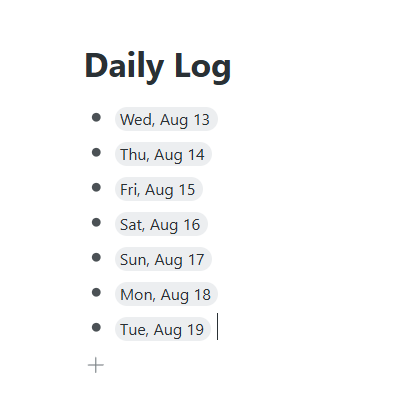
Hi apologies for the late reply. My setup involves a Daily log. In these date nodes (see screenshot) I Interstitial journal anything that comes to mind and then process the days entries at the end of each day. I also use future date nodes as a calendar to hold any tasks in.
Sometimes when reviewing or finding a date node, I would like to find todays note easily or as a reminder to return back to the right daily log node - without unhiding my laptop’s date or putting in “Today” in the search bar.
@fmotta2 This is the only mention of the new feature i could find. It is great. However, I am curious if there will be any settings available for this?