how does this one work?
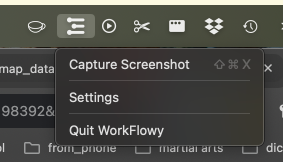
- is capture screenshot is it supposed to capture the current screen or just the workflowy window? nothing happens on click.
- settings doesn’t open on click
- quit works

how does this one work?
Thanks for flagging this, you’re not missing anything. This menu appeared in the current Mac desktop build before the feature was ready.
“Settings” isn’t connected yet. “Capture Screenshot” is intended to capture the full display your pointer is on, not only the Workflowy window - then let you crop or highlight it and either copy it or save it to Workflowy.
We’ve disabled the menu in development while we finish the feature. Sorry for the confusion!
Ohhh mistery solved! It was working pretty well for me - already captured a number of screenshots - and now I am missing it! Bring it back! 