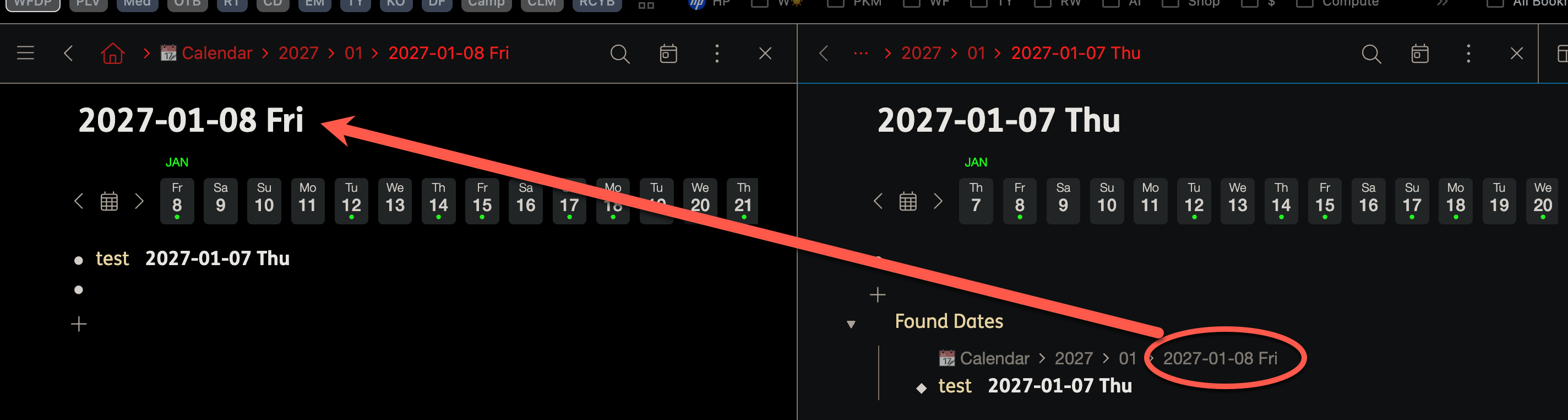
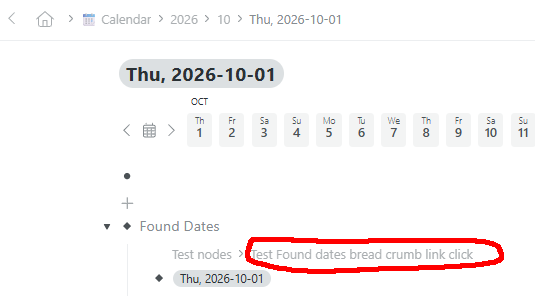
When using panes in the WF Calendar node, clicking on a Found Date breadcrumb in a an active secondary pane opens the date in the primary (leftmost) pane instead of the secondary pane where I clicked on the breadcrumb.
Expected behavior: Clicking a Found Date breadcrumb in a secondary pane should open the date in the currently active (secondary) pane.
Actually, I mean simply clicking the date itself under Found Dates (without Ctrl (Win) /Cmd (Mac)or Alt (Win) /Option (Mac)). This opens the found date in the primary pane on the left. If I press Ctrl (Win) /Cmd (Mac)or Alt (Win) /Option (Mac) before clicking on the date, a new pane opens to the right of the active pane.
Ah. So as far as I can tell, the issue is NOT that you are clicking on a date. It is that you are clicking on a link in the breadcrumbs. In your example, it happens to be a date, but the same bug shows when you click on any breadcrumb for any Found Date item.
I really appreciate the effort you’re putting into helping me with this issue. Clearly, I haven’t explained it very well. I have modified my original post to try and make it more clear.
I wasn’t aware that the links under Found Dates were considered breadcrumbs. From what I read on help.workflowy.com, I understood a breadcrumb to be “the navigation path shown in the menu bar (at the top of the page) when you zoom into a nested bullet/list.”
In this scenario, under Found Dates, I’m clicking the link to a Calendar node/date (the path showing where the bullet containing the date is located)
It sounds like you’re saying that the issue also occurs when clicking the link to the specific bullet associated with the date.
Yes, I’m confirming the issue, but I’m also clarifying it. It’s not specifically about clicking on a date, it’s about clicking on any breadcrumb link under Found Dates.