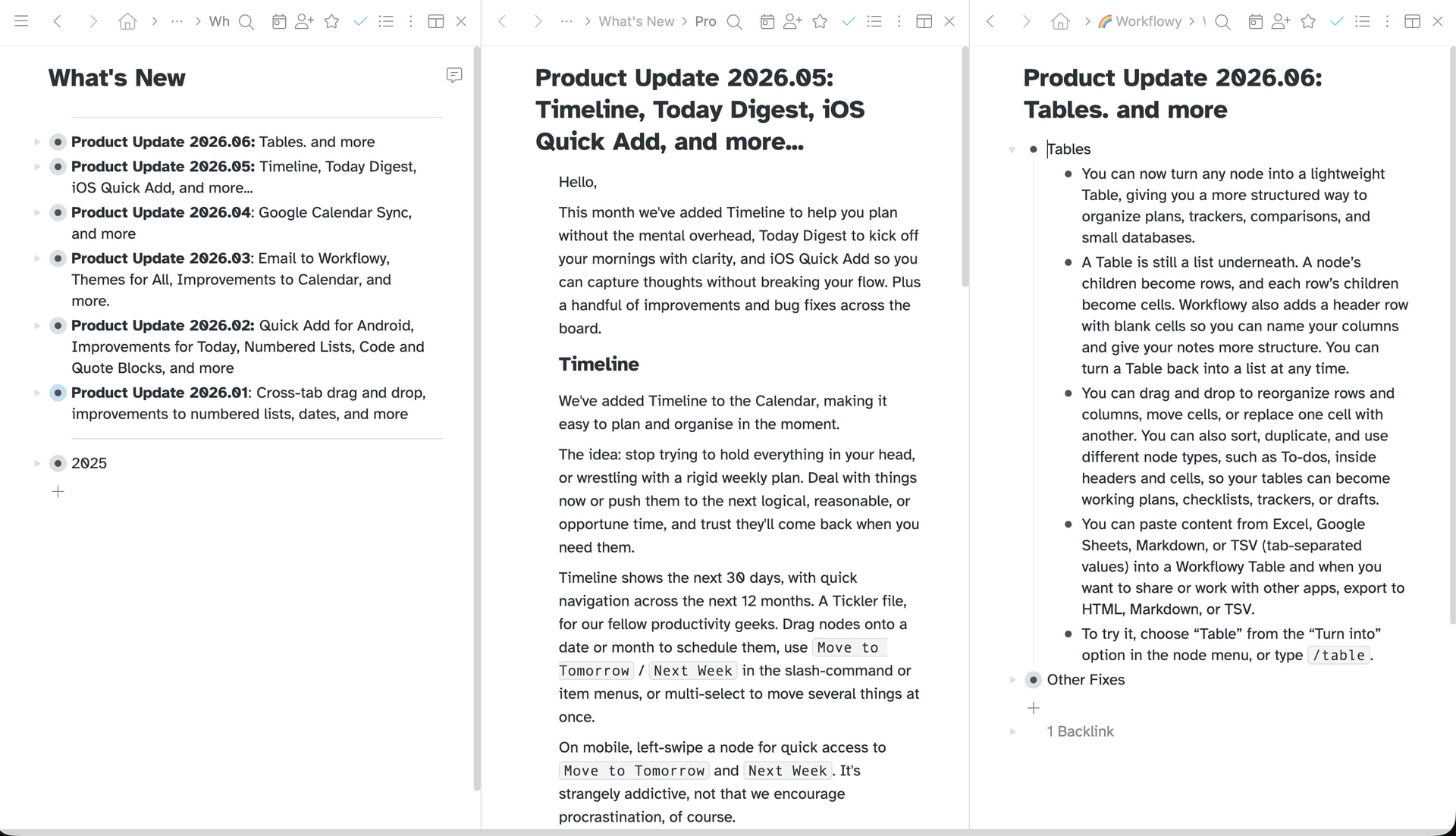
Side pane doesn’t appear to have been “announced” yet, but it showed up in the menu and I’ve been LOVING it. I’m astonished at how much MORE useful this makes Workflowy - it just fits my brain so well!
One request: I would prefer if the side pane did NOT follow the search / filter results.
I’m usually using the side pane to keep an “overview” of a day, week or project, while using the main window to zoom in on details and specifics. Having the side pane filter along with search results is disorienting to me. I’d rather the side pane stay as it’s own independent view.
Yes, I would just like the side pane to be a separate independent panel. Meanwhile, in Edge (and some other browsers), you can split the window into 2 independent sites. Not as performant or robust as a separate WF-controlled panel would be, but works for me.
I am aware of the split view, but thank you for the reminder!
Turns out, one of the things I am loving most about the Side Pane is that I can put internal workflowy links in it, and they open in the main window, while leaving the side pane untouched.
Its a feature I’m not sure I ever even would have thought to ask for, but now that it’s there, I really am astonished at how much it helps me.
I totally agree!
Give a lot of fexibility using the left side panel and right side panel. They each have their purpose.
I tend to either leave my “inbox” or my “today” node in the right panel.
I am very happy to see this implemented – it was a feature request which I sugested in the end of 2022. I thought they ignored it. But the implementation is strange. I imagine more like a dual panel file like Dolphin file manager – each of the panels has its own path and search. And to have their own close button. Now these work really strange and nonintuitive to me.
Yes! I love it for keeping my day or week in the main window and then sliding the pane over for pulling tasks from my backlog into specific days. I can also see opening an “inbox” sidebar and then navigating all over in the main window to similarly drop things into their respective buckets. It’s great that it’s not too prescriptive, so the use cases people find might be all over the place.
Well I’ve just spent 20 minutes losing my mind after seeing the Side Pane option in the settings and searching everywhere for this supposed menu option 'cos it ain’t there. Version 4.3.2607221820 appears to have removed the menu item and I’ve got some annoying macOS menu bar item that I can’t get rid of instead.
I rolled back to the previous version which lost the menu bar icon and gained the Open in Side Pane menu so happy days. If only there was some way to prevent bloody auto updates… other than locking the app directory that is.
But the real question is why? Why remove the side bar menu item and why add a menu bar icon I can’t get rid of?
Hey Phil -
I realize coming to rely on an unannounced beta feature may not have been wise of me, but I have come to rely on the side pane!
I’m avoiding the “New Version” for now; because I don’t want to lose the side pane.
Could you please let us know what the next version comes out that has it back?
Would be super appreciated!
Really missing the side pane, too! Wish you would have put a note in the settings section saying that it’s currently being worked on. I’ve been trying everything I can think of to make it work in the desktop app over the past couple of days, then stumbled upon this thread. Can’t wait for it to get back.
We’ve replaced “Side Pane” with “Panes” (this is the improved version).
You can now open multiple panes side by side, making it easier to view, navigate, and edit several parts of WorkFlowy at once.
Each pane can be navigated and searched independently, while still working together through drag and drop.
Press the ‘Pane’ button in the header, or chose ‘Open in Pane’ in the node menu to create a new pane.
Panes is in Labs for now, so expect a few rough edges and changes. Available now on beta.workflowy.com and if you used “Side Pane,” you should see Panes after reloading.
Thanks for the update Phil.
One big thing it sounds like this takes away… can I click a link in one pane and have it open in the other? That was actually one of the features of the side panel that I was surprised to find was a HUGE help in how I used Workflowy. It sounds like this new panes set up doesn’t do that?
That ability to keep a “master view” in the side pane and then view different stuff in the “main” pane was a a really great help to me.
EDIT: Should have looked at the beta before commenting - looks like the links opening in the other pane STILL WORKS. Awesome!!
FYI Phil -
I see the panes option at beta.workflowy.com.
However, even though I see the toggle in Labs on my desktop version, and have it enabled, I do not have a “open in pane” option in the desktop download.